

Trust
Security and your data
Written for the person who has to approve it. What is stored, what leaves the machine, what does not, how the security log works, what is hardened by default, and what is still open.
The short version
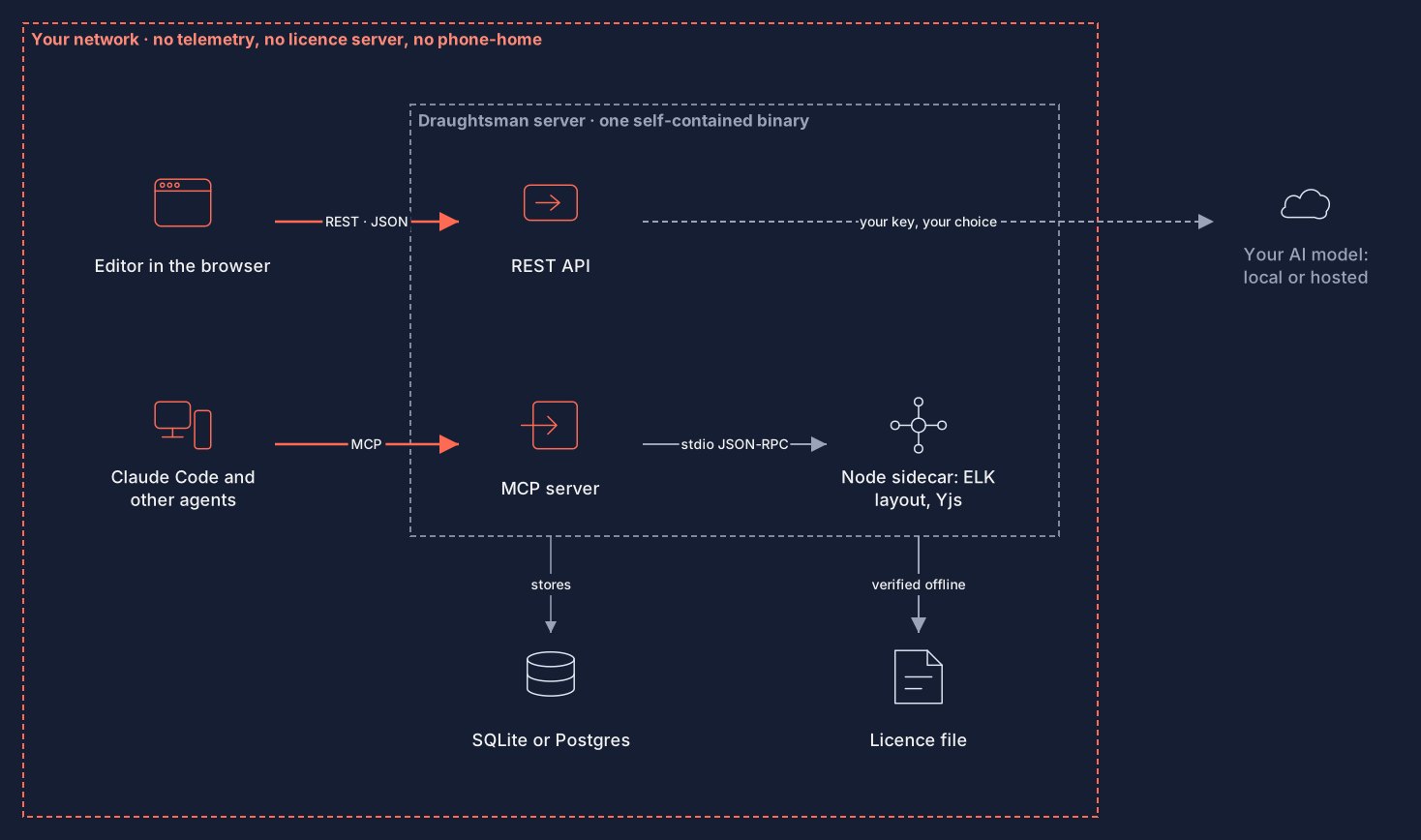
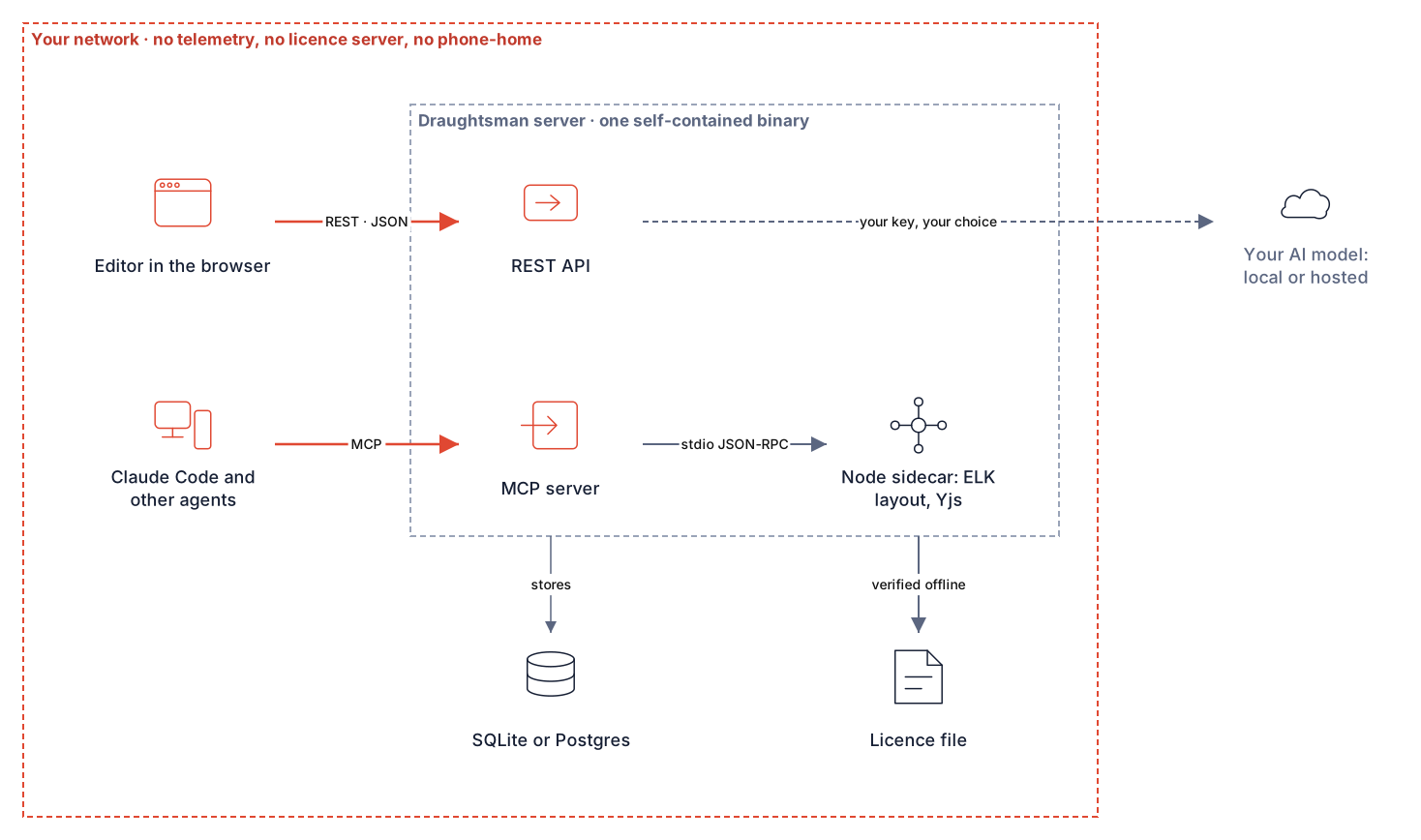
A running Draughtsman server stores everything in one data folder (and, if you choose Postgres, one database you run). It makes no outbound network connection of its own unless an administrator configures an AI provider, or points the database at another host. There is no licence server, update check, telemetry or crash reporting. The browser talks only to the server it was loaded from.
Check it yourself
We checked this on the documentation instance rather than just asserting it.
- Sockets. A snapshot of the server process, taken after using the AI panel and the editor, showed one listening socket and nothing else; its layout sidecar had none:
$ lsof -nP -a -p <server pid> -i COMMAND PID USER FD TYPE DEVICE SIZE/OFF NODE NAME draughtsm 65930 ericwroolie 328u IPv4 0xa0db… 0t0 TCP 127.0.0.1:58874 (LISTEN) $ lsof -nP -a -p <sidecar pid> -i (no output) - The browser. Loading the home page, the editor, Users, AI, Themes, About and Status in a real Chrome made 98 requests, all to the server's own address. The fonts (Inter and JetBrains Mono) are bundled, and nothing is fetched from a CDN.
- The code. A search of the source for
HttpClientlists only the four AI providers and their wiring. The full recipe is in the data-flow guide, in thedocsfolder of the archive. - On your own deployment, run it behind a default-deny egress firewall and exercise it. That is the proof that counts.
What is stored, and where
The data folder is DRAUGHTSMAN_DATA (/data in the Docker image; otherwise data/ beside the executable). On Unix the server sets its umask to 077, so every file it creates is owner-only; on Windows the protection is the folder's ACL. It warns at start-up when the folder is open to other users.
| Path | Contents |
|---|---|
draughtsman.yaml | Settings. With Postgres it holds the connection string, including the password, in plain text: protect the file. No other secret. |
data.db (+ -wal, -shm) | The SQLite database (default). With Postgres the same tables live in your Postgres. |
data.db.pre-migration-<stamp> | A full copy taken before an upgrade migrates it; the newest 3 are kept. |
assets/* | Uploaded images, content-addressed on disk; metadata is in the database. |
branding/*, themes/* | Your logo, favicon, product name and organisation themes. |
keys/* | The key ring that encrypts the stored AI key and the anti-forgery tokens, and a small file naming its protection (it holds no key). |
email/settings.json | Outgoing email settings saved in the browser; the SMTP password only as an encrypted payload under the key ring. Left out of backups unless --include-secrets. |
outbox/ | Only with the development email.provider: file: each message as a text file, holding its reset link in the clear. Never use it in production. |
setup-code.txt | Only when running as a Windows service and before the first administrator exists: the setup code, readable by Administrators and SYSTEM only, deleted when the administrator is created. |
chromium/ | Only with PDF export: a throw-away browser profile per render, removed afterwards. |
backups/secrets-<time>/ | Copies of ai/settings.json and email/settings.json made once if an upgrade re-protects a secret an older build tied to its install folder. Never deleted by the server. |
ai/settings.json | The AI provider, model and endpoint in plain text; the API key only as an encrypted payload. |
logs/* | Only if logging.file.enabled is set (off by default): a rolling file, 14 days. Also the service log on macOS. |
backups/key-ring-<time>/ | Copies of keys/ and ai/settings.json, made once before the server repairs or protects an existing ring. Not made on a fresh install. |
licence.key | The signed licence file, if you have installed one. |
In the database:
- Documents: the current diagram as JSON, the update log, and every saved version.
- Deleted diagrams: a soft delete. The row stays, with who deleted it and when, for 30 days, then a daily pass removes it with its versions. They are in backups until then.
- Users: email, display name, role, an Argon2id password hash (19 MiB, 2 passes), created and last sign-in times.
- Sessions and API tokens: only the SHA-256 of the secret. The raw value exists in the cookie, or is shown once when a token is made.
- Password-reset links: only the SHA-256 of the secret, single use, with an expiry; the secret itself is in the link's fragment and nowhere on the server. A backup leaves this table's rows out.
- Document audit: who did what to which diagram, when, and for an agent the provider and model.
- Security events: sign-ins (including failures), password and role changes, token creation, exports, recovery, each with the actor's and target's email and the source IP address, never a password, token or hash. No retention job deletes them.
What leaves the machine
This is every outbound call or network reach found in the source, runtime first. Anything not listed was not found.
| What | When | On by default? | Turn it off |
|---|---|---|---|
| HTTP request to the AI provider (four provider classes) | Each AI call and Test connection; the prompt and diagram content described on the AI page. Where the endpoint may point is restricted (details) | No: no provider is set | Leave the provider empty, or Reset in Admin, AI |
| SMTP connection to the mail server an administrator names (Admin, Email) | A password-reset email, and the test message the administrator asks for. Content: the reset link and a short fixed text, to the person who asked (or to the administrator for a test) | No: email is off until configured | Leave email unconfigured; or remove saved settings. Admin-only, and an administrator can name any host and port, so firewall outbound connections if that matters to you |
| HTTPS request to a web page and up to 8 of its stylesheets, for a draft theme (Admin, Themes, From a website) | An administrator presses Fetch and read colours, and only if the operator turned it on. The request carries no cookie, credential or document; the response (at most 2 MiB) is read for its colours and discarded. Details | No: themes.fetchFromUrl.enabled is false and the address box is not shown | Leave it false. Pasting CSS needs no network |
| Postgres connection | While running | No: SQLite is the default | storage.provider: sqlite |
| Node sidecar (child process, stdio) | At start; documents to lay out go over a pipe | Yes, local only; it opens no socket | It is needed for layout |
| Headless Chromium for server-side PDF (child process) | A server-side PDF export (the editor's PDF prints from the person's own browser and sends nothing); the rendered SVG, in a page with JavaScript off and no network | No: optional and off | Leave export.chromium.enabled false |
macOS security tool (child process) | At start with key-ring protection auto or keychain | macOS only | keyRing.protection: key, certificate or none |
systemctl, launchctl, sc, chown | draughtsman service … only | Never run unprompted | Do not run the verb |
| Help, Documentation | A user clicking it. With nothing set, the browser opens this server's own copy of the guides at /docs/ (behind sign-in), or the vendor's page when the install has no docs folder. An external address opens with noopener,noreferrer so no Referer is sent | Yes | about.docsUrl: "" hides the entry |
| Support contact on About | A mailto: link the user clicks | Yes | Set about.supportContact |
Nothing else: no licence check (the licence service reads one local file), no update check, no telemetry or analytics, no crash reporter, no email unless an administrator sets up outgoing mail (the row above), no DNS lookups except those the AI and Postgres clients (and, if switched on, the theme fetch) make for their configured hosts. For a network with no route out at all, see Air-gapped installs.
The server also sends Content-Security-Policy: default-src 'self'; …; connect-src 'self'; …; frame-ancestors 'none' on every response, so a theme file or a document that named an outside host would be blocked by the browser.
Build time and install time are different
None of this happens when the server runs. If you build from source, build the image, or add PDF, the build fetches from NuGet and npm; the Docker build from Docker Hub, Microsoft's registry, Debian mirrors and NodeSource; the optional Chromium install from Playwright's download hosts. A release archive is self-contained and installing one needs no network.
Logs and personal data
- The security log holds user ids and the source IP and, for a sign-in against an unknown account or one that was throttled, the email address that was typed.
- Start-up logs the data folder path and the first-run setup code, to the console only. The file logger redacts the code, but a service manager that captures the console (journald,
docker logs, the macOS log) keeps it. It is valid only until the first administrator exists. - A request refused for its
Hostheader is logged. - The AI key, passwords, tokens and session values are never logged.
Hardening defaults
- Sign-in on every route. A global policy requires an authenticated user; only health, the theme, sign-in and first run, and the web app's own static files are anonymous. A test requests every registered route anonymously and expects a refusal.
- Sessions and tokens. Server-side revocable cookies (
HttpOnly,SameSite=Lax,__Host-andSecureover HTTPS); anti-forgery tokens on cookie writes; tokens stored as hashes, expiring, scoped; account and token management need a browser session. - Throttling and limits. Failed sign-ins per account-and-address and per address; per-route request body limits; per-user rate limits, with caps on PDF, layout, import, AI and MCP; time-bounded importers.
- Headers and host. Content-Security-Policy with
frame-ancestors 'none', nosniff, referrer policy,X-Frame-Options, a Host allow-list, and HSTS underforceHttps. - Uploads. Images are sniffed by content, not name; an uploaded SVG goes through a strict allow-list and is served with a policy that forbids everything.
- Child processes. The layout sidecar and the PDF browser run with an allow-listed environment (no AI key); the PDF page runs with JavaScript off, no network and a sandbox where the platform allows.
- Data folder. Owner-only permissions and a warning if it is not.
- Passwords. Argon2id, at least 12 characters, constant-time failure for unknown accounts.
The security event log
Admin, Security is an append-only list of who did what and from where: sign-ins and failures, throttling, first-run attempts, accounts created, role changes, deactivation, password changes and resets, password-reset requests, links created, emails sent or failed, links used or refused, email settings changed or removed, AI endpoint host changes and refusals, and each theme-from-a-web-page fetch, API tokens made and revoked, the host-shell recovery, whole-instance exports, and a diagram moved to the bin, restored or deleted for good. Each row has the actor, the account it concerned and the source address, and never a password, token or reset link. A failed-sign-in or throttle row is written once per bucket per window, so an attacker who is being blocked cannot grow the table. Only an administrator can read it. It is not pruned (see the limitations).
API tokens: expiry and scope
Every token has an expiry (default 90 days, at most 365: auth.tokens) and a scope. A read token may only GET; over MCP its two write tools refuse it. A token carries its owner's role, but account and token management, the instance export, themes, branding, AI and email settings all require a browser session as an administrator, so a token minted by an administrator cannot create more tokens or manage accounts. A token can revoke itself; revoking another needs an administrator in a browser. A password reset by an administrator or by reset-admin revokes the person's tokens; a reset link and a self-service change leave them alone. A sweep test requests every registered route with an expired token and a read token and expects refusal.
Request and rate limits
Every route has a request-body limit, enforced before the handler reads a byte: 16 KiB for sign-in and account routes, 256 KiB for AI, about 3 MB for importers, 10 MiB for documents, layout, exports and MCP, 1 MiB for anything else; uploads have their own cap. PDF, layout, import, AI and MCP calls are limited per signed-in user per minute, and PDF, layout and AI calls are capped in flight across the instance; a call over a limit is 429 with Retry-After. They are limits in draughtsman.yaml. Failed sign-ins are throttled per account-and-address (five, then 429 for 15 minutes) and per address (twenty). The importers' pattern matching has a five-second ceiling per step, so a source built to make it backtrack is refused rather than tying up a thread.
Security headers
Run against the current build (curl -sI on the home page):
Content-Security-Policy: default-src 'self'; script-src 'self' 'unsafe-eval'; style-src 'self' 'unsafe-inline'; img-src 'self' data: blob:; font-src 'self' data:; connect-src 'self'; worker-src 'self' blob:; object-src 'none'; base-uri 'none'; form-action 'self'; frame-ancestors 'none'
X-Content-Type-Options: nosniff
Referrer-Policy: same-origin
X-Frame-Options: DENY
Permissions-Policy: camera=(), microphone=(), geolocation=(), payment=(), usb=()
Add Strict-Transport-Security by serving over HTTPS with server.forceHttps. The CSP carries 'unsafe-eval' only because the web app compiles the document schema in the browser; see the limitations.
Private files
On Unix the process sets its umask to 077 before it creates anything, so a new data folder's database, key ring, settings, logs and backups are owner-only, and the server warns at start-up if the folder is open to other users. Run for this page, the database and key folder showed -rw------- and drwx------. On Windows the protection is the folder's access list: service install cuts inheritance and leaves full control to SYSTEM, the Administrators and the service account (run on Windows 11 Arm64; the earlier build had left the folder readable by every local user, which is fixed), and the server warns with the fixing icacls command if Users, Everyone or Authenticated Users can read or change it. The setup code on a Windows service is in a file only Administrators can read, never in the world-readable Application log. Backups and the export are written owner-only too.
The licence file is verified offline
A licence is a signed file on disk, checked with a public key built into the program, with no network call and no licence server. Whether you have a licence changes only a notice for administrators: it never blocks reading, saving, exporting or an agent, and nothing that touches a document consults it. The server keeps no copy of your licence anywhere but the file. See Licensing for what is built today and what is not.
Backing up secrets
Most of the folder is ordinary data and draughtsman backup covers it. Three things are not in a default backup, on purpose: the key ring (keys/), the stored AI settings (ai/), and the log files. The consequences:
- A restored instance has a new key ring and no AI key; the administrator enters the key again.
--include-secretskeeps them. The bundle is then named…-SENSITIVE.zipand says so inside. Treat it like a password vault.- The key ring is itself protected by something that is not in the data folder: Windows DPAPI, the macOS login Keychain, a key-encryption key from an environment variable or a file, or a certificate. Back that protection up separately: a key-encryption key belongs in your secret store, not in the bundle, or a restored folder cannot open its stored key. On Linux and Docker with none configured the ring is plain text and the key is readable by anyone who can read the folder; the server says so at start-up and on the AI page.
- Backups always contain password hashes. They are written owner-only; keep them access-controlled and off the machine.
Details and the modes are on AI features; the procedure is on Backup, restore and upgrading.
Reporting a vulnerability
Email draughtsman@overpass.co.uk with the subject line Security: Draughtsman. There is no separate security mailbox and no published PGP key yet; if you need an encrypted channel, say so in a first message that contains no details. Please do not open a public issue or post details elsewhere first. Targets, not service levels: we acknowledge within 3 working days, say whether we can reproduce and how serious it is within 10, and aim to fix or mitigate a confirmed high or critical issue within 30 days of confirming it. We ask for no more than 90 days of privacy. Only the latest release is supported. There is no bug bounty, and no claim of certifications or audits.
Known limitations
- The AI endpoint is restricted, with residual risks (see AI features): Test connection against Ollama can still probe private addresses, a system proxy resolves names itself, and a host an operator lists is trusted with the key. If those matter, leave AI off.
- 'unsafe-eval' in the Content-Security-Policy, because the web app compiles the document schema in the browser. There is no
'unsafe-inline'script and no external script host. - Security events are kept indefinitely and include email and source IP addresses.
- The database is not encrypted by Draughtsman; the folder is owner-only on Unix. Use disk encryption.
- Release archives are not yet code-signed or notarised. Check them against
SHA256SUMS. - One organisation of trust: no Viewer role, no per-document permissions, no single sign-on, no multi-factor authentication.
- TLS, backups of the key-encryption key, and network egress controls are the operator's.
Every release carries a software bill of materials in CycloneDX form (inside each archive as SBOM.cdx.json, and beside the archives), generated by a script in the repository that uses no network. The third-party licence notices are in THIRD-PARTY-NOTICES.txt in every archive, and served by the application at /THIRD-PARTY-NOTICES.txt.