

Using Draughtsman
Import and export
Text and open formats in; pictures and text out. Nothing is locked into a proprietary file.
| Format | In | Out |
|---|---|---|
| DSL (the lossless text form) | The Text pane (Apply), POST /api/import/dsl, MCP create_document | File menu, Export DSL; POST /api/export/dsl |
| JSON (the document model) | POST /api/documents, MCP create_document | GET /api/documents/{id}, MCP read_document |
| Mermaid | Import Mermaid: flowchart, graph, sequenceDiagram, erDiagram | Export Mermaid (a .mmd file) and Copy as Mermaid: flowchart, sequenceDiagram, erDiagram |
| draw.io, Visio | Import draw.io (.drawio, .xml), Import Visio (.vsdx): Moving from draw.io, Visio and Lucidchart | |
| SQL DDL | Import SQL: T-SQL, PostgreSQL, MySQL, SQLite | POST /api/export/sql (API only; no menu entry) |
| SVG, PNG | File menu, in the browser. An unlicensed copy adds a small notice | |
File, Export PDF…: your browser's print dialog, nothing to install. Server-side PDF (GET /api/documents/{id}/pdf, for scripts and agents) is optional | ||
| Fly-through | File menu, Export fly-through (HTML): one self-contained file |
Importers are stateless: they read your text and show you the result; nothing is saved until you choose Create diagram. A document that arrives with no positions (every Mermaid or SQL import) is laid out first.
Import Mermaid
On the home page or the file menu, choose Import Mermaid, paste a Mermaid flowchart, sequenceDiagram or erDiagram, and choose Read diagram. A sequence diagram becomes participants and messages in the order written; an erDiagram becomes tables and relationships. A construct Draughtsman cannot represent produces a warning and is flattened, never a silent loss. Node kinds are guessed from Mermaid shapes and flagged when genuinely uncertain.

Over the API, a Mermaid sequenceDiagram becomes a sequence document. This is the command from the product's README, run against the documentation instance (the response is summarised here):
curl -s -X POST 'http://localhost:5180/api/import/mermaid?title=Checkout' \
  -H "Authorization: Bearer $DRAUGHTSMAN_TOKEN" -H 'Content-Type: text/plain' \
  --data-binary $'sequenceDiagram\n  participant U as Customer\n  participant W as Web app\n  U->>W: Place order\n  W-->>U: 201 Created'
type: sequence, title: Checkout
nodes: p_U participant "Customer", p_W participant "Web app"
edges: m_1 sync p_U -> p_W "Place order", m_2 return p_W -> p_U "201 Created"
warnings: []Import SQL
Import SQL reads CREATE TABLE statements (and ALTER TABLE constraints and CREATE INDEX) in T-SQL, PostgreSQL, MySQL or SQLite. Each table becomes one entity node, each foreign key becomes a connector drawn from the child to the parent and labelled with the key columns. A foreign key is drawn one-to-one only when its columns are exactly the child's primary key or a unique key. A table whose composite primary key includes a foreign key becomes a weak entity. The reader is tolerant: a statement or column modifier it has no use for is stepped over, and anything it cannot read is one warning naming the statement and line, never an error.

The same import over the API:
curl -s -X POST 'http://localhost:5180/api/import/sql?dialect=postgres&title=Shop' \
  -H "Authorization: Bearer $DRAUGHTSMAN_TOKEN" -H 'Content-Type: text/plain' \
  --data-binary $'CREATE TABLE customers (id int PRIMARY KEY, name text NOT NULL);\nCREATE TABLE orders (id int PRIMARY KEY, customer_id int REFERENCES customers (id));'
type: architecture, title: Shop
nodes: t_customers entity "customers" columns ["PK id int not null", "name text not null"]
t_orders entity "orders" columns ["PK id int not null", "FK customer_id int null"]
edges: e_1 association t_orders.col:customer_id -> t_customers.col:id "customer_id"
warnings: []Relationships the database does not enforce. Some schemas leave a relationship out of the database and write it in a comment. Two exact comment shapes are read, and nothing else, so prose that mentions an arrow draws nothing: an inline -- -> UserTypes.Id (no FK) on a column's own line, and a whole comment line that is exactly dbo.ChangeHistory.UserId -> dbo.Users.Id. They are drawn as dashed connectors labelled (no FK). Add ?implied=off to skip them.
SQL export (POST /api/export/sql) writes an entity diagram back as DDL for a chosen dialect. Import, export, import again is pinned as equivalent per dialect in the product's tests; the one loss is the FK marker on a column whose target table is not in the diagram. Dashed (no FK) connectors are deliberately not written out as constraints.
DSL: the text form
The DSL is a public, documented format. It is what the Text tab shows, what an agent reads and writes, and what you can keep in version control. It is lossless: parsing and printing a document gives the same text back, which the product's tests hammer with a round-trip fuzz test.
draughtsman 1
type architecture
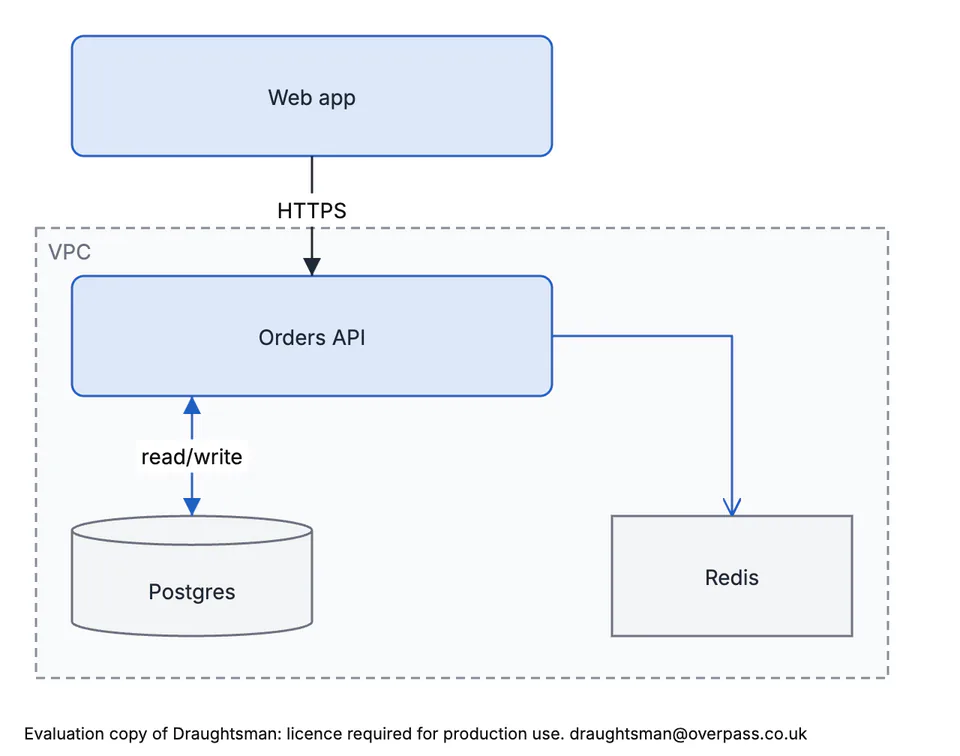
title "Order service"

node n_web service "Web app" @ 40,40 320x80
container c_vpc "VPC" @ 16,168 568x300 { n_api n_db }
node n_api service "Orders API" @ 40,200 320x80 ports=[in@0.5,0 db@0.25,1] owner="platform"
node n_db database "Postgres" @ 40,360 160x80

edge e_1 flow n_web -> n_api.in "HTTPS" routing=orthogonal
edge e_2 data n_api.db -> n_db "read/write"
Labels and string values are always double-quoted. Geometry (@ x,y wxh), style and ports are optional. A parse error names its line and column, for example Line 6, column 22: expected the target node. The full grammar ships in the archive's docs folder, as the DSL reference and its grammar file.
Import draw.io and Visio
Next to Import Mermaid on the Documents page are Import draw.io and Import Visio. They read a .drawio or .xml file and a .vsdx file into a new diagram, keep positions and sizes (nothing is laid out), and list what they could not carry. A Lucidchart document comes in by exporting it to Visio first. The full page, with what was run and what was not, is Moving from draw.io, Visio and Lucidchart.
SVG and PNG
Open the file menu and choose Export SVG or Export PNG. Both are drawn in your browser from the document, cropped to the diagram, on the diagram theme's export paper (white in the shipped overpass and neutral themes), using the same connector routes the editor shows. The SVG is a drawing you can edit in a vector tool; the PNG embeds the fonts it needs. Pick the diagram theme in the editor's Theme menu before exporting: the diagrams on Diagram types use the neutral theme, which suits white paper, and the shipped dark Overpass theme draws light text that is unreadable on white in some icon labels.
On white export paper the shipped overpass diagram theme can draw icon labels in near-white text. That was found while making this documentation, and the neutral theme does not have the problem. If your organisation theme starts from overpass, look at an export first.
The evaluation notice on exported pictures
An unlicensed copy is a fully working evaluation on the honour system. The one visible difference is a small notice on every rendered export, while the copy is unlicensed (or its licence file does not verify). This is the exact text, with the support address at the end, which is the instance's about.supportContact (it is draughtsman@overpass.co.uk unless an operator changes it):
Evaluation copy of Draughtsman: licence required for production use. draughtsman@overpass.co.ukIt is drawn inside the picture, in a band added under the diagram, so it never covers a node, a label or a connector, and the diagram itself is drawn exactly as it would be without it. It is in the paper's own text colour on the paper's own background, small, and in English.
| Output | Marked while unlicensed? |
|---|---|
| SVG export, PNG export | Yes. We exported both from the browser and read the line in the SVG text. |
| PDF from the browser (the default route) and PDF from the server | Yes. We read the line in the browser's print view, and in the text of a PDF made by the server route. |
The agent tool render_document (SVG or PDF) | Yes. We rendered an SVG over MCP and found the line. |
| Export fly-through (HTML file) and Present | Yes: one fixed line along the bottom of the window. Documented by Overpass; we did not open these for this check. |
DSL, JSON, Mermaid, SQL, backups, read_document, the whole-instance export | Never. A customer's own data is never altered. We exported DSL and read the document over MCP and found no line. |
| The thumbnails on the Documents page | No: a preview card, not something a person exports. |
A licensed copy, and one whose licence covers fewer updates than the build it runs (the "updates expired" state), get no notice. Nothing is limited or blocked in any state: no page, node or export count, no watermark over the diagram, no delay, and no network call. The server reads the same local licence file it already reads, and the browser asks the instance it came from, so a licence dropped into the data folder stops the marking on the very next export with no restart.
This is deliberately an honour system with a visible reminder, not a lock: an SVG is text, and anyone can delete the line from a file they exported. It makes an unlicensed copy's output identifiable, to the person who made it, to whoever receives it, and to support. We could not show the other side (a licensed copy with no line) because no production verification key is built in yet; see Licensing.
There are two ways to a PDF, and the first needs nothing installed.
| Route | What it is | Needs |
|---|---|---|
| Browser print (the default) | File, Export PDF… draws the diagram on a page and opens your browser's print dialog; you choose Save as PDF. | Nothing. It runs in the browser and makes no request. |
| Server Chromium (optional) | The server prints the diagram through a headless Chromium and returns a file: GET /api/documents/{id}/pdf, the render_document tool's pdf format, and the dialog's Export PDF button once it is switched on. | A Chrome, Chromium or Edge on the server (turn it on). The route for scripts, scheduled PDFs and agents. |
Browser print
The dialog offers the page size (A4, A3, Letter or Fit to diagram), the orientation and the margin. It draws the same picture that Export SVG and Export PNG produce, so the shapes, theme colours, connector routes and fonts match, using the theme you picked in the editor's Theme menu. On a fixed page the drawing is scaled down to sit inside the margins, never up, centred, on a single sheet. Backgrounds are printed and the page takes the drawing's own paper colour, so a dark theme does not sit in a white frame. The margin is padding inside the sheet and the page's own margin is zero, so the browser has no margin area to print its own header and footer into. The document's title is the print document's title, which Chrome offers as the file name. If the browser blocks the print window, it prints from a hidden frame in the same page instead.

What we ran: on the current build we opened the print route from the editor in real Chrome (the window opened, and the page asked the browser to print exactly once; we replaced the print call with a counter, so we did not see the browser's own dialog); the print view's page rule was @page{size:297mm 210mm;margin:0} (A4 landscape, matching the dialog), and it carried the evaluation line. We did not drive the real Save as PDF dialog, so the file's details are the browser's: some browsers add their own header and footer or offer their own scaling, so choose the page size in the dialog to match what you asked for. Overpass records its own real-Chrome check in its PDF guide.
What it cannot do: the file is made by your browser, in a print dialog rather than a download, so an agent or a script cannot ask for it and it cannot run headless or on a schedule. Those want the server route.
Server Chromium (optional)
Without it everything else works, including browser print. With it on, the same dialog offers Export PDF (the server's file) as the primary button, and Print in browser… beside it:
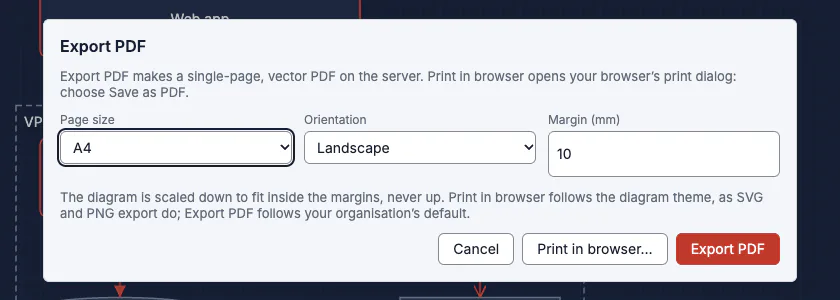
The server route's PDF carries the organisation's default diagram theme, not a personal choice from the Theme menu (browser print uses the viewer's theme, as SVG and PNG export do). We ran it on the current build with export.chromium pointed at the system Chrome and got a PDF back; pdftotext read the evaluation line from it:
$ curl -s -o order.pdf -w '%{http_code} %{content_type} %{size_download} bytes' \
    -H "Authorization: Bearer $DRAUGHTSMAN_TOKEN" 'http://localhost:5180/api/documents/doc_order_service/pdf?pageSize=a4'
200 application/pdf 27513 bytes

$ pdftotext order.pdf - | grep -v '^$' | tail -2
Redis
Evaluation copy of Draughtsman: licence required for production use. draughtsman@overpass.co.uk
The same page options apply to the endpoint as query parameters: pageSize (fit, a4, a3, letter; default fit), orientation and margin (0 to 50 mm). The server prints in a page with JavaScript off, no network, and a content security policy that allows nothing, so a document cannot make the server fetch anything.
Export Mermaid and DSL
Export Mermaid saves a .mmd file and lists anything it had to simplify; Copy as Mermaid puts the text on the clipboard instead. A shape or arrowhead Mermaid cannot spell degrades with a %% comment, and the dialog tells you a copy is lossy. Here is the checkout sample from the home screen:
sequenceDiagram
    title Sample: Checkout
    actor user as Customer
    participant web as Web app
    participant api as Orders API
    participant pay as Payments
    user->>web: Place order
    web->>+api: POST /orders
    api->>+pay: charge(total)
    pay-->>-api: receipt
    api-)web: declined
    api-->>-web: 201 Created
    api->>api: audit()
Export DSL saves the document's text, including its fly-through path if it has one. Mermaid has no way to say a camera path, so Export Mermaid leaves it out.
Fly-through HTML
Export fly-through (HTML) writes one file, about 29 KB for a small diagram, with the drawing and its player inside. It needs no server, no network and no library. See Fly-through presentations.
Getting everything out
An administrator signed in in the browser can download GET /api/admin/export: every diagram as JSON and as DSL text, plus every uploaded image, in one zip with a manifest. It is a way out in open formats, not a backup (no history, users or settings), and an API token cannot call it. There is no button for it yet. See Backup, restore and upgrading for the real backup.