

Using Draughtsman
Moving from draw.io, Visio and Lucidchart
You can bring an existing diagram in instead of drawing it again. Draughtsman reads draw.io files and Visio (.vsdx) files. Lucidchart has no import of its own: you export from Lucidchart to Visio and import that file. Each route keeps what a diagram stores best, the shapes with their text, sizes and positions, the groups they sit in and the connectors between them, and says plainly what it could not carry. Nothing is saved until you create the diagram, and the diagram is not laid out, because the person who drew it already placed every shape.
| You have | Do this |
|---|---|
A draw.io (diagrams.net) file, .drawio or .xml | Import draw.io, next to Import Mermaid on the Documents page, or File, Import draw.io… in the editor. |
A Visio drawing, .vsdx (Visio 2013 or later) | Import Visio, in the same two places. |
| A Lucidchart document | In Lucidchart, File, Export, Visio (VSDX), then Import Visio. |
An older Visio file, .vsd (2003 to 2010) | Open it in Visio, Save As .vsdx, then Import Visio. |
Lucidchart's own .lucid file | Not read. Export to Visio from Lucidchart instead. |
What was run, and what was not
| Part | State |
|---|---|
| draw.io import, in the editor and over the API, plain and compressed files, several pages, a refused file | Run by us on the current build, with the five hand-written sample files that ship in Overpass's test suite (they are written to look like real draw.io exports; we did not use a file saved by draw.io itself). |
| Visio import, in the editor and over the API, two pages, kind guessing, refusal of a wrong or old file | Run by us, with a small .vsdx built by a script the way Overpass's tests build theirs (a ZIP of XML). It is not a file saved by Visio or Lucidchart. Overpass's own checks used real Visio-written files; we did not repeat those. |
| The Lucidchart route | Not verified against Lucidchart. Nobody here used a Lucidchart account. The export menu path above is where the command has been; if your Lucidchart words it differently, look for the Visio export under File. What Lucidchart puts in a file for each of its shapes, and what it does with a multi-page document, are unchecked. |
Visio (.vsdx)
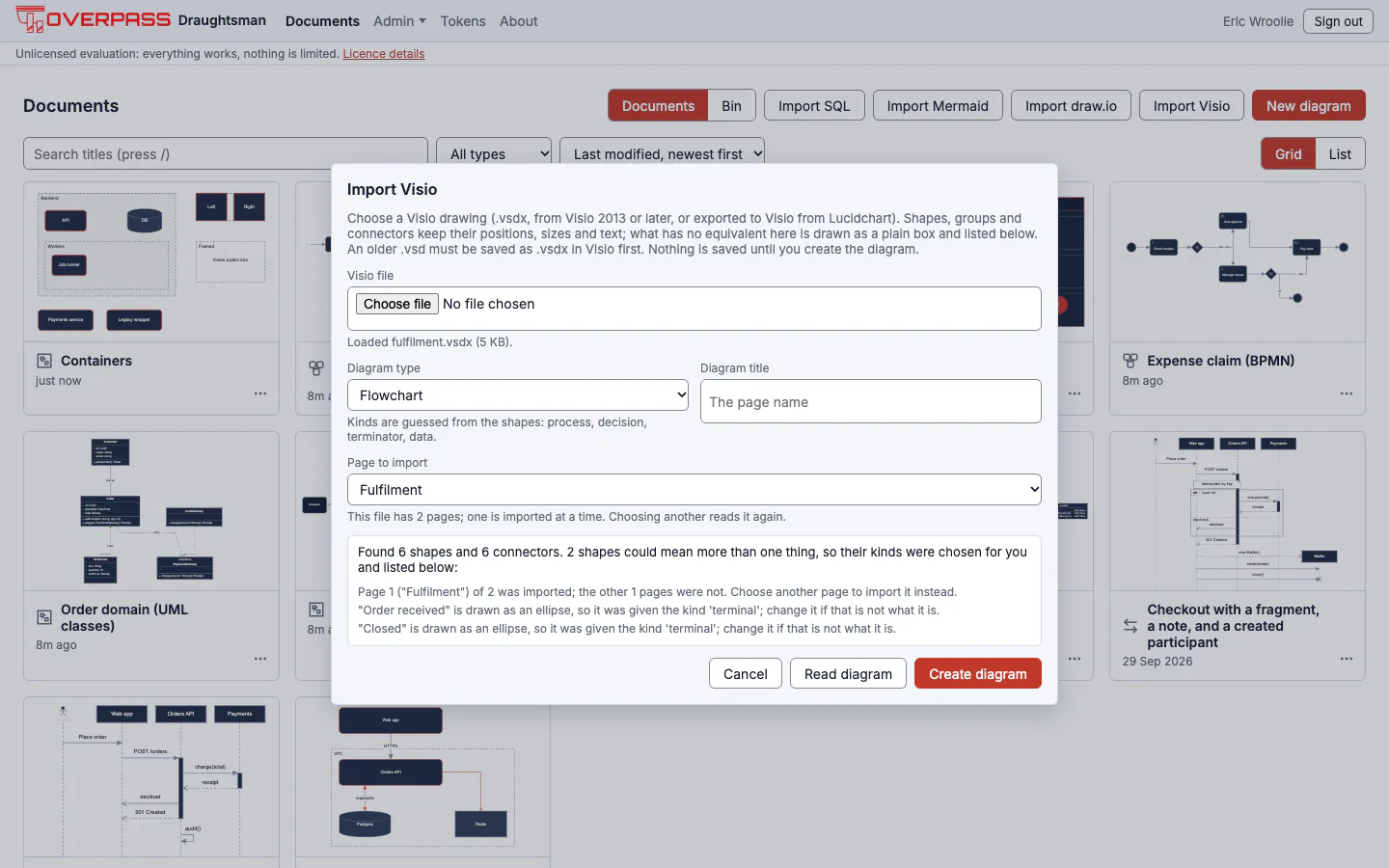
Open Import Visio. There is no paste box: a
.vsdxis a binary package, so the file itself is what is read. It can be up to 3,000,000 bytes (about 2.9 MiB); the dialog says so before it uploads anything.Choose the Diagram type: Flowchart reads Visio's flowchart shapes as flowchart kinds, Architecture as services, databases and queues, Freeform keeps only the picture and guesses no kinds. Then Read diagram. The dialog shows what it found and lists every warning, so a wrong file or a wrong type is caught before a document exists.
A file with several pages imports one page at a time, with a Page to import list. Each import makes its own diagram.
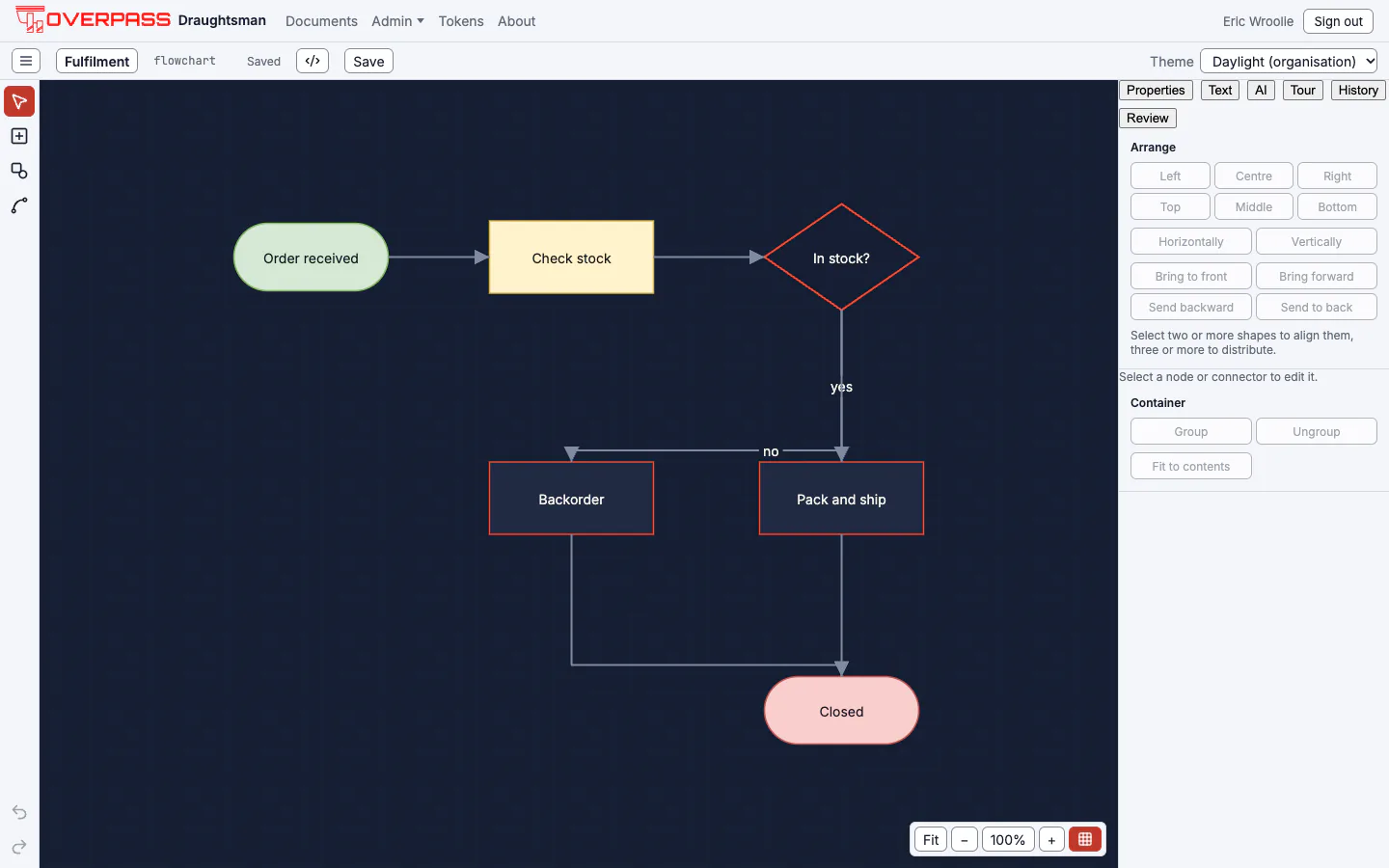
Create diagram saves it and opens it, as drawn. Tidy layout is there if you want it; it moves every shape.
What comes across
| In Visio | In Draughtsman |
|---|---|
| A shape's text | The node's label. Paragraph and line breaks stay. |
| Position and size | The node's geometry. Visio measures in inches from the page's bottom-left with y pointing up; the node is placed in canvas units (100 to the inch) from the top-left, so the picture is the same way up. |
| A shape turned in Visio | The same rotation, about the shape's centre. |
| A group | A container holding its children, with positions worked out through every group they sit in. |
| A shape dropped from a master | Sized and drawn from the master (Visio stores only a dropped shape's position and text). |
| A connector glued at both ends | An edge between the two shapes, with its text as the label. |
| A connector's line ends | The nearest arrowhead. A connector with no arrowhead at either end becomes an association; any other a flow. |
| Fill, line colour, weight and pattern, text colour, size, bold | The node's sparse style, only where the shape (or its master) wrote them down as a colour. |
What is guessed and what is lost
A Visio shape is a master with a name, or an outline with no name, so the kind of each is a guess. The master's name wins (Process, Decision, Start/End, Document, Database, Actor, Cloud, Note, Swimlane and the rest of the flowchart set); otherwise the outline decides. A guess that is a real judgement is flagged kind-guessed, and the dialog counts those apart from what was lost. Whatever Draughtsman has nothing for is a warning, never a failure, and one warning says each kind of loss once, with its count, so a drawing of three hundred stencil shapes does not answer with three hundred lines:
- Stencil shapes with no equivalent (a network switch, a cloud-provider icon, a floor-plan symbol), custom outlines, pictures and embedded objects are drawn as plain boxes with their text.
- Shape data, data graphics, themes' effects, shadows and fonts are not carried. Layers collapse to one canvas, and a shape on a hidden layer is left out.
- A flipped shape is drawn unflipped. A connector with a loose end, or glued to something that is not a shape, is left out with the reason.
- Not carried at all: named styles, text alignment, gradients, hyperlinks, comments, backgrounds, stencil files, and hand-drawn connector bends (the editor routes right-angled connectors itself).
Safety and limits
A .vsdx is a ZIP of XML from whoever sent it, so it is read to refuse rather than to cope. It is opened in memory; nothing is unpacked to disk and nothing in it is fetched.
- The ZIP is checked before any part is read: at most 3,000,000 bytes and 5,000 entries; an entry name that could leave its folder, a repeated name, an encrypted entry or a size claim larger than the file itself refuses the whole file. A size header that lies is caught by counting what really comes out of the decompressor.
- No DOCTYPE. Visio never writes one; one is how an XML file smuggles in entity bombs, so the file is refused before anything in it is read.
- Counted limits (2,000,000 XML elements, 64 levels of nesting, 10,000 shapes on the page, 500 pages), each refused with a message that names it. Only the chosen page and the masters it uses are opened.
A refused file is a 422 from the API, an error in the editor, with the reason in the message. It is never a half-read diagram.
From a program or an agent
Run for real$ curl -s -X POST 'http://localhost:5180/api/import/visio?type=flowchart&page=1&title=Fulfilment' ... --data-binary @fulfilment.vsdx (a small .vsdx built by a script, not saved by Visio)
found 6 nodes and 6 edges; pages: [(1, 'Fulfilment'), (2, 'Refunds')]
warning page-selected: Page 1 ("Fulfilment") of 2 was imported; the other 1 pages were not. Choose another page to import it instead.
warning kind-guessed: "Order received" is drawn as an ellipse, so it was given the kind 'terminal'; change it if that is not what it is.
warning kind-guessed: "Closed" is drawn as an ellipse, so it was given the kind 'terminal'; change it if that is not what it is.
$ an empty ZIP (a ZIP that is not a Visio drawing, as a Word or Excel file is), then an older binary .vsd
{"type":"https://tools.ietf.org/html/rfc4918#section-11.2","title":"The source could not be imported.","status":422,"detail":"That is a ZIP package but not a Visio drawing: it has no Visio document part. A .docx, .xlsx or .pptx file sent by mistake looks like this.","traceId":"…"type":"https://tools.ietf.org/html/rfc4918#section-11.2","title":"The source could not be imported.","status":422,"detail":"That is an older Visio binary file (.vsd), or a password-protected Visio file, not a .vsdx drawing, and Draughtsman cannot read it. Open it in Visio, remove any password, and
[HTTP 422]
An agent uses the MCP tool create_document with format set to visio. A tool argument is text, so content is the file base64-encoded, up to 3,000,000 bytes before encoding; type, page and layout work as above. We did not drive the MCP route for Visio ourselves; the REST route above was run.
Lucidchart
Lucidchart can export a document as a Visio file, and Draughtsman imports that. It does not read Lucidchart's own .lucid format, and it cannot read a Lucidchart account directly.
In Lucidchart, open the document and choose File, Export, Visio (VSDX). Lucidchart downloads a
.vsdxfile.In Draughtsman, Import Visio and choose that file, exactly as above. If the document has several pages the dialog lists them and each is imported on its own.
Pick the diagram type, Read diagram, read the warnings, Create diagram.
In the one Lucidchart-written file Overpass checked against, a flowchart process shape is a group that is an instance of a master named like com.lucidchart.ProcessBlock21.<hash>, with the outline in one part of the group and the text on the group. Draughtsman reads that name, drops the prefix, number and hash, and takes the outline from the part, so a process box comes across as a process box. Only that one block name has been seen in a real Lucidchart file; for any other, the outline decides.
What is lost, honestly. The export is a Visio file that Lucidchart wrote, so you get what Visio files say: a basic fill and line, text colour and size are kept; gradients, shadows, fonts, text alignment and theme effects are not. Lucidchart's data-linked shapes, conditional formatting, formulas and custom shape data are not carried. A shape from one of Lucidchart's own libraries (cloud-provider icons, network symbols, UI mockups) becomes a plain box with its text. Layers collapse to one canvas, and comments, hyperlinks, notes, embedded pictures and page backgrounds are not carried.
This page's description of Lucidchart's export comes from Overpass's notes on one public sample file and from files built in the same shape for the tests. If an export does not import the way this page says, the warnings in the dialog are the first place to look, and the file is an ordinary Visio file that Visio can open to see what Lucidchart wrote.
draw.io
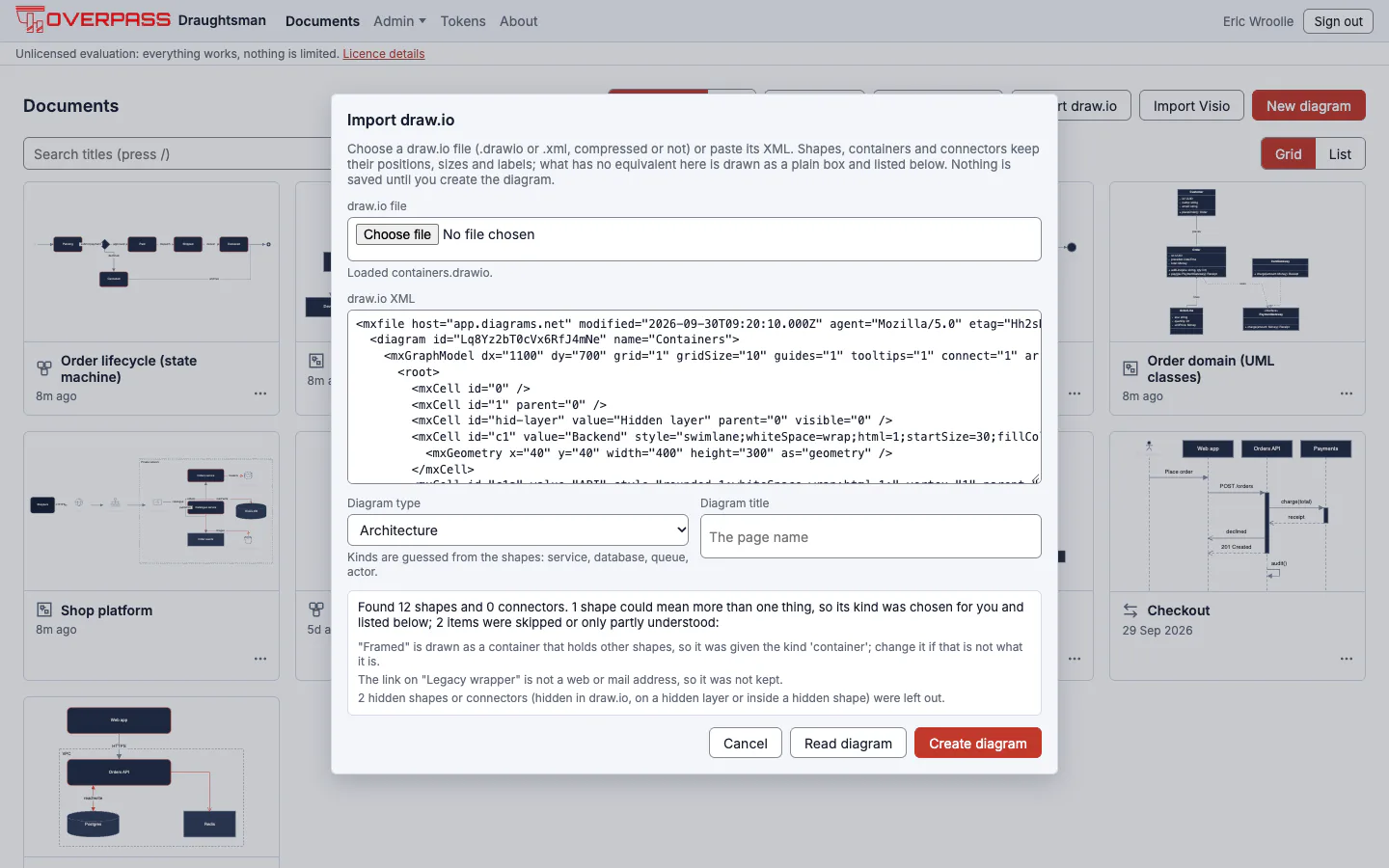
Choose Import draw.io and a .drawio or .xml file. Both of draw.io's spellings are read: plain XML, and the compressed form draw.io saves by default. A file with several pages imports one at a time, with a Page to import list. draw.io keeps more of a shape's look than Visio does, so if you can choose, a draw.io file carries more styling than a Visio export.
What comes across
| In draw.io | In Draughtsman |
|---|---|
| A shape's label | The node's label as plain text. An HTML label is reduced to its text: line breaks stay, every tag, script and style is dropped. |
| Position and size | The node's geometry, absolute (a shape in a container is relative to it in draw.io; the container's origin is added). A rotation is kept. |
A swimlane, group, container=1 shape, or a shape with others inside it | A container holding those shapes. |
| A connector | An edge between the same two shapes, with its label, routing mode, line colour and width, dash and arrowheads. |
| An orthogonal connector | Orthogonal routing with no stored bends: draw.io's points for it are hints for its own router, and the editor finds the route from the shapes. Straight and curved connectors keep their points. |
| Fill, outline, text colour, font, size, bold, dashed | The node's sparse style. Colours are carried only as hex; none becomes transparent. |
| A shape's custom data | Props, one per attribute (up to 50 entries of 2,000 characters). |
| ER and UML arrowheads | The matching head (one, many, zero or many, inheritance, aggregation, composition), and the connector becomes an association. |
What is guessed and what is left out
A drawing has no types, so the kind of each shape is a guess from how it is drawn: a rectangle is a process (flowchart) or a service (architecture), a diamond a decision, a cylinder stored data or a database, and so on. A guess that is a real judgement is flagged kind-guessed. Freeform guesses nothing. Whatever has no equivalent is a warning, never a failure, and is drawn as a plain box: an AWS or Azure stencil, a picture (pictures are not imported and nothing is fetched from their address), a triangle, a table. Connectors with a loose end, or attached to a hidden shape, are left out. Not built: export to draw.io, connection-point constraints, stencil libraries, shadows, gradients, sketch mode, and several pages in one go.
Safety and limits
A .drawio file is XML from whoever sent it, and compressed XML can be a thousand times bigger than the file. A file with a DOCTYPE is refused unread; a compressed page stops inflating at 16 MiB; and counted limits (8,388,608 characters of XML, 150,000 elements, 32 levels of nesting, 10,000 shapes and connectors, 500 pages) each refuse with a message that names them. Labels are text: a script, an onerror or a javascript: link in a draw.io label never reaches a diagram.
From a program or an agent, and a refused file
Run for real$ curl -s -X POST 'http://localhost:5180/api/import/drawio?type=architecture&page=1&title=Orders' -H "Authorization: Bearer $DRAUGHTSMAN_TOKEN" -H 'Content-Type: application/xml' --data-binary @containers.drawio
found 12 nodes and 0 edges; pages: [(1, 'Containers')]
warning kind-guessed: "Framed" is drawn as a container that holds other shapes, so it was given the kind 'container'; change it if that is not what it is.
warning unsupported-syntax: The link on "Legacy wrapper" is not a web or mail address, so it was not kept.
warning unsupported-syntax: 2 hidden shapes or connectors (hidden in draw.io, on a hidden layer or inside a hidden shape) were left out.
$ ... the same with the compressed form draw.io saves by default (compressed.drawio)
found 5 nodes and 5 edges; pages: [(1, 'Order flow')]
warning kind-guessed: "Start" is drawn as an ellipse, so it was given the kind 'terminal'; change it if that is not what it is.
warning kind-guessed: "End" is drawn as an ellipse, so it was given the kind 'terminal'; change it if that is not what it is.
$ ... a file with several pages (multipage.drawio), page 2
found 3 nodes and 2 edges; pages: [(1, 'Overview'), (2, 'Details'), (3, 'Scratch')]
warning page-selected: Page 2 ("Details") of 3 was imported; the other 2 pages were not. Choose another page to import it instead.
$ a file with a DOCTYPE (entity bomb) is refused unread
{"type":"https://tools.ietf.org/html/rfc4918#section-11.2","title":"The source could not be imported.","status":422,"detail":"The draw.io file contains a DOCTYPE declaration. draw.io never writes one, and Draughtsman refuses it: it is how an XML file smuggles in entity bombs and reads of other files.","traceId":"…"}[HTTP 422]
An agent uses create_document with format set to drawio, content the file's XML, type one of flowchart, architecture or freeform, and page for a multi-page file. It is laid out only if layout is true.
Before you rely on an imported diagram
- Read the warnings. The
kind-guessedones are a check to make; the others are what was drawn as a plain box or left out. - Check the page. A multi-page file imports one page; the first warning says which.
- Check the connectors. One with a loose end was left out; draw it again (select two shapes and press L) and check the arrowheads.
- Check the kinds in the type you chose, and change any that are not what the shape is.
- Check stencil shapes. Anything named in a warning as a stencil is a plain box: swap it for one of Draughtsman's shapes or icons.
- Keep the original. Draughtsman does not write Visio, Lucidchart or draw.io files back, so the original stays the master until you decide it does not.
Not built
- Export to Visio, Lucidchart or draw.io, and any direct import from a Lucidchart account or a
.lucidfile. - The older binary Visio format (
.vsd) and password-protected files: save as.vsdxin Visio first. - Visio stencil files, layers, shape data, named styles, flips and hand-drawn connector bends.
- Several pages in one go: each page is its own import.