

AI and agents
Agents and MCP
Draughtsman is built so that an AI agent is just another author. It exposes eight tools over the Model Context Protocol, over HTTP with a token and over stdio on the same machine, and the diagram your colleague has open updates when the agent writes.
Connect Claude Code over HTTP
-
Make a token
Sign in, open Tokens in the top bar, give the token a name, choose how long it lasts (7 days to 1 year; 90 by default), and tick Read-only if the agent should only look. The secret (
dst_…) is shown once, with a ready-made command underneath it. Any signed-in person can make tokens for themselves, not only administrators. A token carries its owner's role.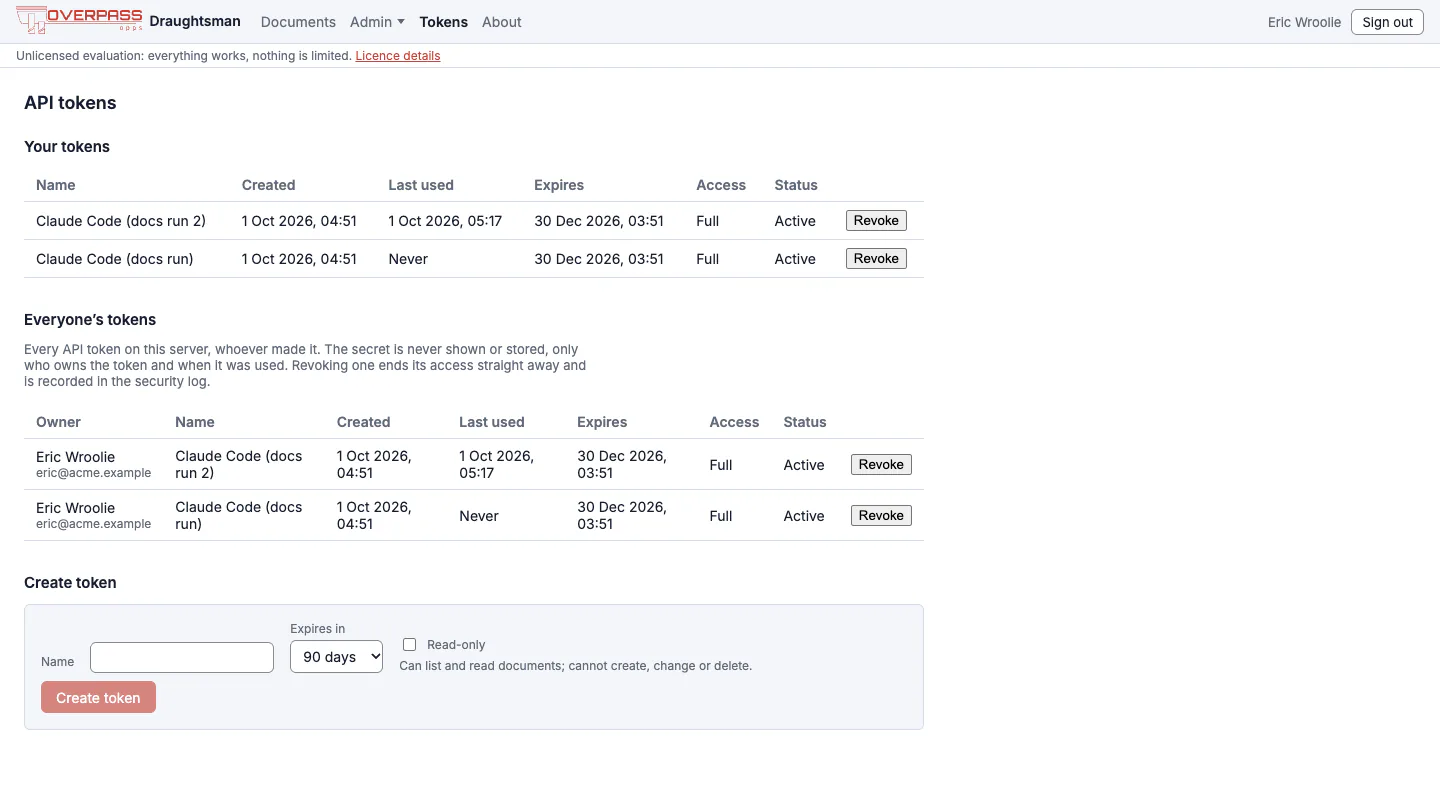
The Tokens page. Secrets are never listed; an administrator sees everyone's tokens and can revoke any of them. -
Add it to Claude Code
claude mcp add --transport http draughtsman https://draughtsman.example.com/mcp \
  --header "Authorization: Bearer dst_..."
For a server on your own machine use
http://127.0.0.1:5180/mcp. We ran this command with Claude Code 2.1.286 against the documentation instance (project scope, under the namedraughtsman-docs, with the instance's own address), then ranclaude -p --mcp-config .mcp.json --strict-mcp-configasking it to calllist_documents. It connected and printed the eleven titles. Claude Code shows a project-scoped server as Pending approval inclaude mcp listuntil you approve it by runningclaude; a normal user-scoped add does not. -
If you forget the token
Every route needs one, including
/mcp. Without it you get:HTTP/1.1 401 Unauthorized WWW-Authenticate: Bearer Authentication required. Send an API token as 'Authorization: Bearer <token>' (create one in the web app under API tokens, or POST /api/tokens). This server does not support OAuth.Claude Code prefixes that with Dynamic Client Registration rejected (HTTP 401), which is its own wording for "I tried OAuth"; it does not mean OAuth is expected. The fix is always the token.

Connect over stdio
When the agent runs on the same machine as the data folder, draughtsman mcp --stdio needs no token and opens no port. It reads the data folder directly, so it is as trusted as anyone who can run it there.
claude mcp add draughtsman -e DRAUGHTSMAN_DATA=/path/to/data -- /path/to/draughtsman mcp --stdioWe ran this against a restored copy of the documentation instance (project scope, name draughtsman-stdio): Claude Code listed the documents, returning 11. A raw JSON-RPC check showed the server answering initialize with draughtsman 0.1.0 and protocol 2025-06-18, listing the eight tools, with nothing but JSON on standard output (logging goes to standard error).
dotnet run as the stdio commandIt prints a Using launch settings from… line to standard output before the server starts, which breaks the JSON-RPC stream. Use the packaged draughtsman binary: draughtsman mcp --stdio. Point DRAUGHTSMAN_DATA at the same folder the web server uses, or the agent will see no diagrams.
The eight tools
| Tool | Arguments (* required) | Returns |
|---|---|---|
list_documents | query, offset, limit (1 to 200) | Items, newest updated first, with a total |
read_document | id*, format: json (default), dsl, outline, mermaid | The diagram as text. outline is one line per element and cheap for a prompt. |
create_document | title*, type*, content*, format* (dsl, mermaid, sql, json, drawio, visio with the file base64-encoded), layout, actor | { id, warnings } |
patch_document | id*, ops*, layout (none, affected, all), actor | The whole patched document and a checkpointVersionId |
render_document | id*, format: svg or pdf, scale | SVG markup, or a base64 PDF when the optional server-side PDF component is on. An unlicensed copy's render carries the evaluation notice; read_document never does |
diff_documents | id*, fromVersion*, toVersion | Added, removed, changed and moved elements |
critique_document | id* | Deterministic structural findings, each with severity and the element ids involved |
get_schema | type | The document schema, and for a type its kind vocabulary and shape libraries |
What an agent can do
- Read.
list_documents, thenread_documentasoutlinefor a cheap look ordslbefore editing.get_schemateaches it the kinds for a type (an unknown kind is accepted silently bypatch_document, so it should check). - Create.
create_documentfrom DSL, Mermaid, SQL, JSON, a draw.io file or a Visio file (see Moving from draw.io, Visio and Lucidchart). Withlayout: truethe layout engine places the nodes; without it, nodes with no position stay unplaced. - Patch.
patch_documenttakes addressable operations, never a whole-document replace:addNode,removeNode,updateNode,addEdge,removeEdge,updateEdge,moveEdge,setProp,removeProp,restyleandsetFlythrough. An unknown operation or a missing target fails the whole call and writes nothing. The server checks nobody else wrote in between, so a concurrent edit is never overwritten.[ { "op": "updateNode", "id": "n_api", "set": { "label": "Orders API v2" } }, { "op": "addNode", "node": { "id": "n_cache", "kind": "cache", "label": "Redis", "shape": "rounded" } }, { "op": "addEdge", "edge": { "id": "e_3", "kind": "data", "from": { "node": "n_api" }, "to": { "node": "n_cache" } } }, { "op": "restyle", "target": "node", "id": "n_cache", "style": { "fill": "#fde68a" } } ] - Render and check.
critique_documentafter a patch;render_documentfor a picture. The server render draws the organisation's default theme; for a branded picture take the diagram to the editor and export. PNG is not available over MCP. - Write a fly-through.
setFlythroughreplaces the camera path whole; see Fly-through. - Sequence diagrams are written as messages in time order;
addEdgewithbeforeorafterinserts mid-stream, andmoveEdgereorders.
Two examples of real output, from the documentation instance (the first is read_document with format: "outline", the second critique_document):
Shop platform (architecture)
nodes:
  n_users [actor] "Shoppers"
  n_gw [api-gateway] "API gateway" in c_vpc
  n_orders [service] "Orders service" in c_vpc
  n_db [database] "Orders DB (Postgres)" in c_vpc
  ...
edges:
  e_4: n_gw -> n_orders [flow]
  e_7: n_orders -> n_db [data] "read/write"
  e_10: n_orders -> n_fraud [flow] "score"

{"findings":[]}
The agent's edit appears in your editor
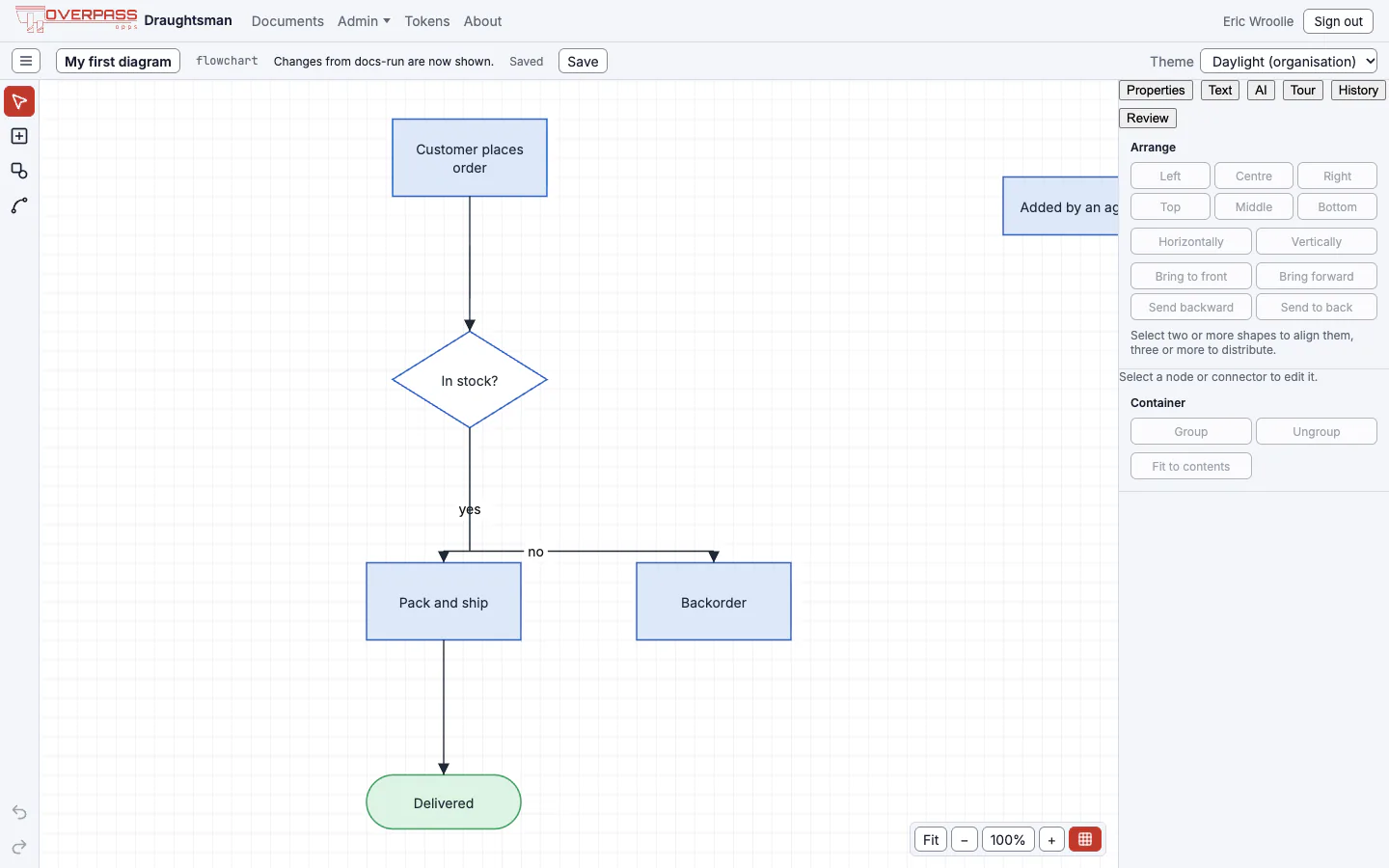
An open editor polls for newer versions about once a second and merges them under your unsaved local edits, reporting any clash. We opened a diagram, had an agent add a node over MCP, and the new box appeared in the open page 0.3 seconds after the patch returned. The agent's edit is not on your undo stack: your Cmd+Z never reverses an agent. Before applying it the server stored a checkpoint of the diagram as it was, so History can restore it.
Who is recorded as the author
Over HTTP the writer is the token's owner. Pass actor: "agent:<name>/<model>" on create_document and patch_document to be recorded as an agent as well: the diagram gets a provenance entry (agent, model, time, created or updated, the element ids touched), and the security and audit trail show the person who owns the token as the owner. The label can only annotate, never impersonate: a user:… or malformed value over HTTP is refused. Over stdio the label is self-reported.
Limits to know
- No delete, rename, restore or licence tool over MCP, no PNG render, and
workspaceis alwaysdefault. - A read-only token can list, read, render, diff, critique and fetch schemas, but not create or patch. A token can never mint tokens, manage users or reach the admin pages, even when an administrator owns it.
- The rate limit is 300
/mcpcalls per user per minute (limits.mcpPerUserPerMinute), counting every call, across all of a user's tokens. Over it, the server answers429withRetry-After. - A tool failure is a normal tool result with
isErrorset and a sentence that says what to correct, for example Unknown patch op 'frobnicate'. Expected one of: addNode, removeNode, … - With a reverse proxy, turn buffering off for
/mcpand raise the read timeout; see Deployment.
The skill file
The archive includes SKILL.md, written for an agent: the DSL rules agents most often get wrong, the tools with real argument names, the failures you will meet word for word, and the document types. Put it where your agent reads skills and it can draw without a human explaining the format first. The full HTTP and MCP reference is the API guide, also in the docs folder of the archive.