

AI and agents
AI features
Draughtsman does not ship a model, and it does not call one until an administrator tells it to. You bring the AI: a model running on your own machine, or a hosted one with your own key. With nothing configured the AI panel is hidden, not broken, and nothing is ever sent anywhere.
What the AI does
There are two features, both in the AI tab of the editor.
- From text. Describe a diagram in words, or paste notes or a Mermaid block, choose a type (flowchart, architecture or sequence), and Generate. On an empty diagram the model writes the whole thing and it is laid out for you. On a diagram that already has content, the model is shown the diagram and asked for the complete updated version; Draughtsman compares that reply with what you had and applies only the difference, so any element the reply left alone keeps its position, style and properties exactly. Either way it lands as one undo step.
- To document. Turn the diagram into a design document, a runbook or a plain-English explanation, as Markdown that cites the diagram's elements by their labels. Clicking a citation selects that element on the canvas. It reads and writes nothing in the diagram.
From text goes through the same checkpointed path an agent uses, and the provider and model are recorded on the diagram as the author of what they changed.
Run it fully locally with Ollama
This is the setup where nothing leaves your network. These are the steps we ran, on a Mac that already had Ollama installed.
-
Have Ollama running with a model
Install Ollama from ollama.com (not done here: it was already installed). Then:
Outputollama --version ollama listollama version is 0.34.2 NAME ID SIZE MODIFIED gemma4:12b-it-qat 38044be4f923 7.2 GB 2 days ago gemma4:31b-cloud c382fbfbc73b - 5 months ago ...If you have no model yet,
ollama pull <name>downloads one (we did not run it: the model below was already on the machine, and it is a 7 GB download). Ollama listens onhttp://localhost:11434.Models ending in :cloud are not localThe last rows above end in
:cloud. Ollama itself forwards a request for those to Ollama's cloud, which Draughtsman cannot see. Pick a plain local name if "stays on this machine" matters. We usedgemma4:12b-it-qat. -
Point Draughtsman at it
Sign in as an administrator and open Admin, AI. Choose Ollama (local), type the model name exactly as
ollama listshows it, leave the endpoint athttp://localhost:11434, and choose Save settings. The page applies at once, with no restart. A local model needs no key.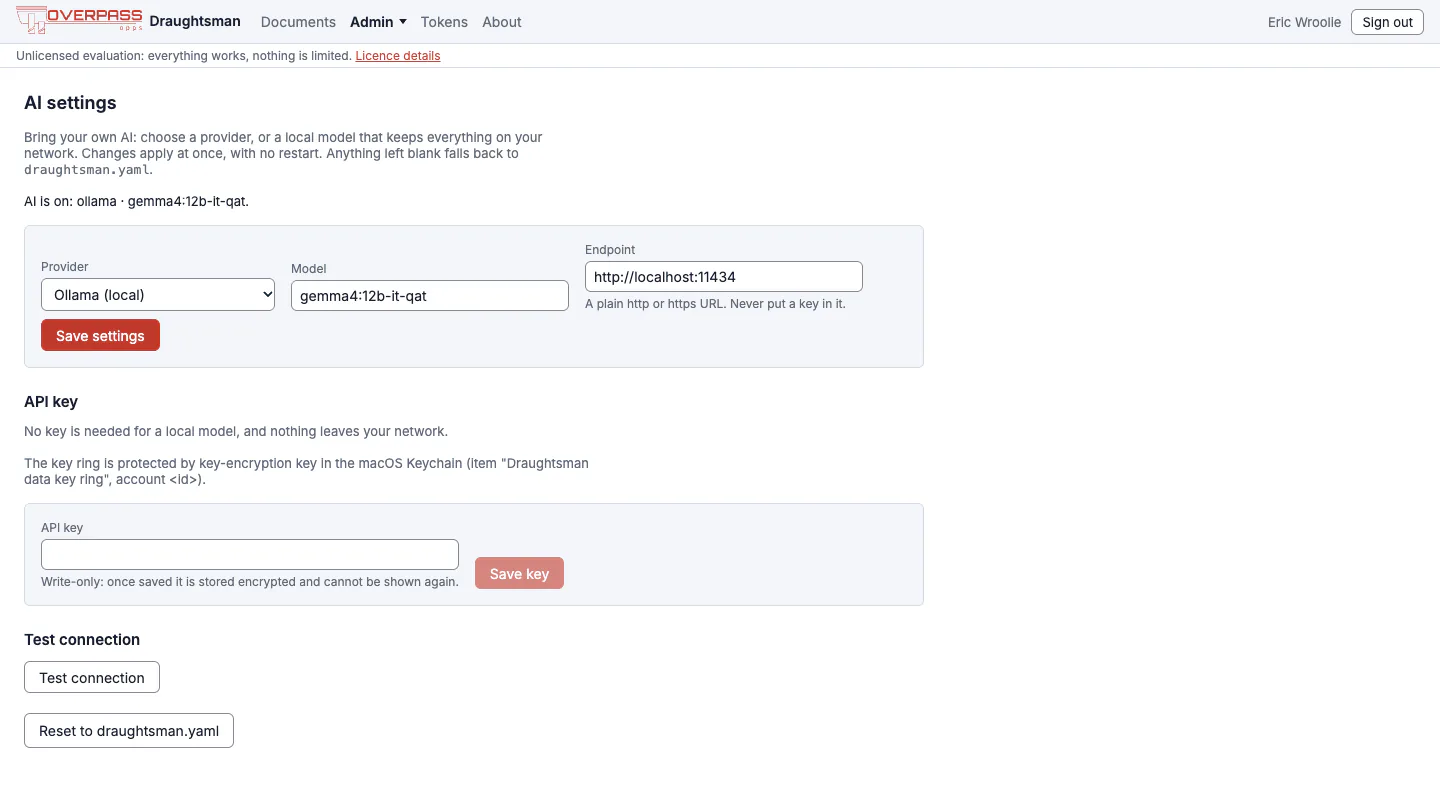
The AI settings page after saving. The key-ring line mentions an account id that has been replaced here. -
Test the connection
Choose Test connection. It sends one short fixed prompt, with no diagram, and says in plain words what happened. Ours said:
Connected: ollama answered using model gemma4:12b-it-qat.With a wrong endpoint it says things like Could not reach 127.0.0.1:1. Check the endpoint, and that the server is running and reachable from this machine.
-
Generate
Open a diagram, choose the AI tab, describe what you want, pick a type, and choose Generate. We asked a 12-billion-parameter local model for a password-reset flow. It took about a minute, reported "13 added from ollama/gemma4:12b-it-qat", and gave a usable draft. We chose Tidy layout afterwards. One box, "Check if email exists", came out of the model unconnected, which is the reason for the warning under the button: Generated content can be wrong; check it before you share it.
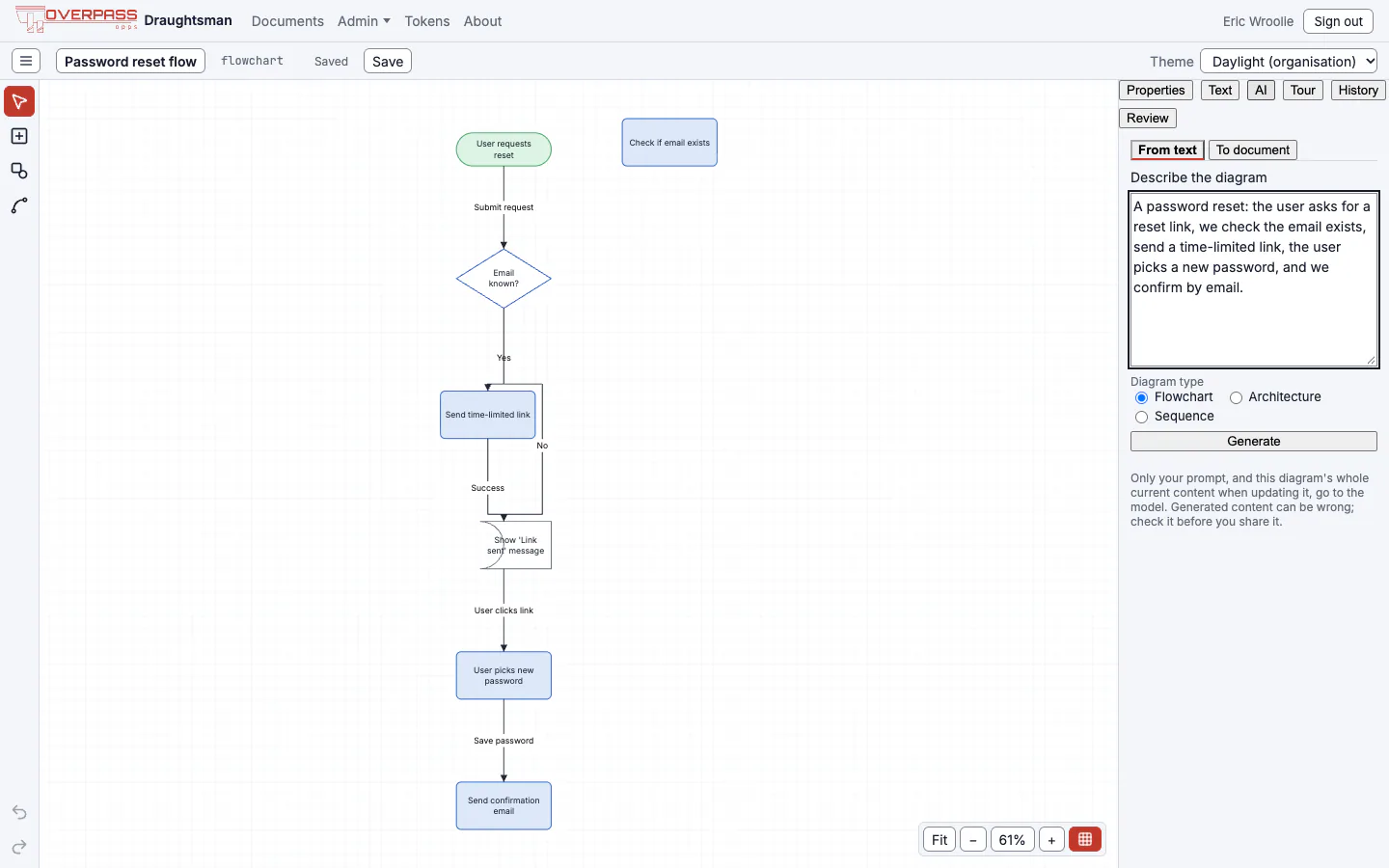
A password-reset flow written by a local 12B model, then tidied. A good first draft, not a finished diagram.

Local inference is slow, so raise ai.timeoutSeconds (default 300) if a large model needs it, and if you use a reverse proxy raise its timeout to at least 330 seconds (Deployment). Use the largest model you can run: the model must write DSL the parser accepts, and Draughtsman asks it once more, quoting the offending line, when the first reply does not parse. How good any particular local model is has not been assessed beyond this one run.
From Docker, localhost is the container. On Docker Desktop use http://host.docker.internal:11434; we checked from inside the image that this reached the host's Ollama and localhost did not. On Linux add --add-host=host.docker.internal:host-gateway (not tried) and make Ollama listen on an address the container can reach.
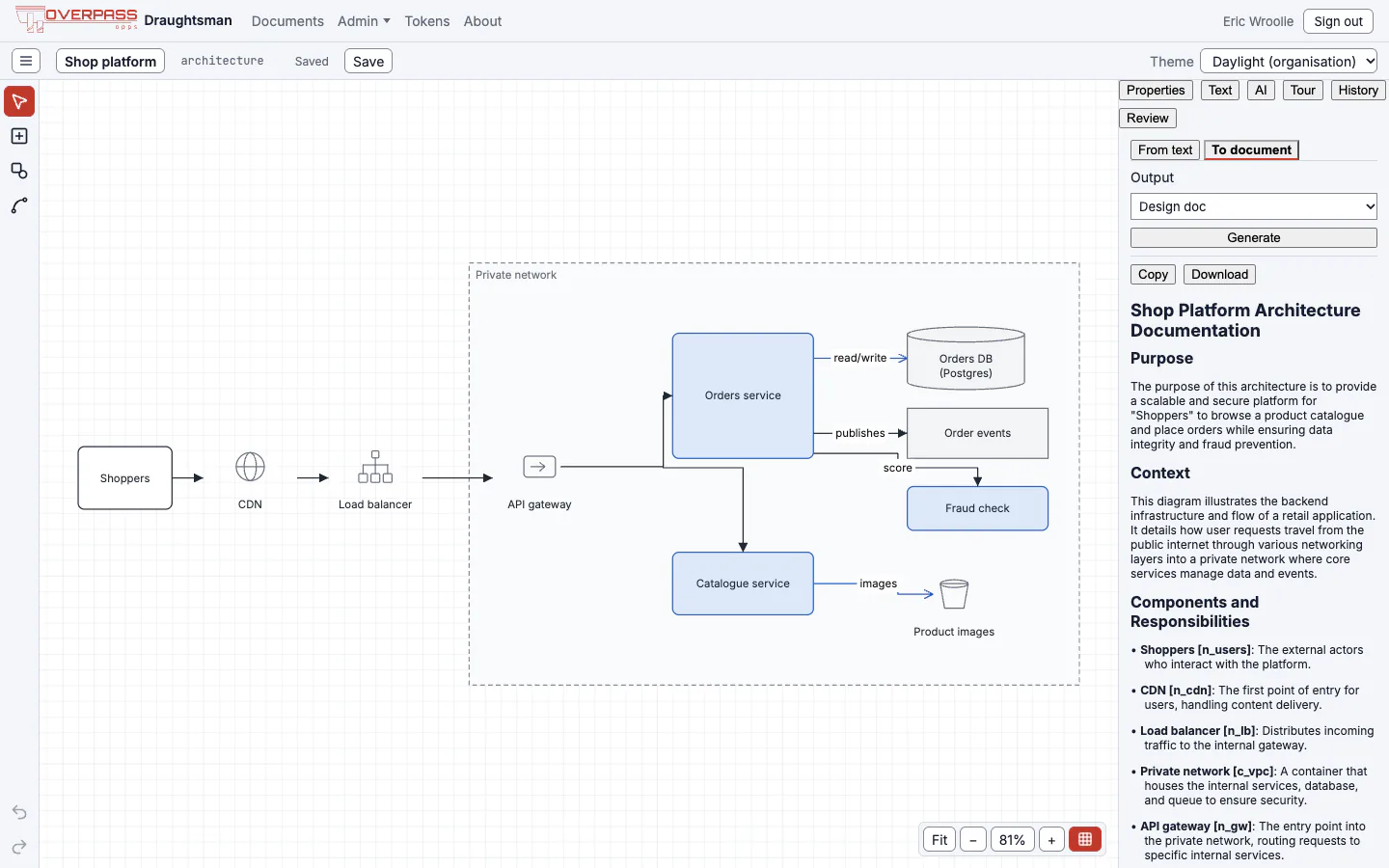
To document
Choose To document, pick Design doc, Runbook or Plain explanation, and Generate. Only the diagram's outline is sent: its title and type, each node's id, kind, label and container, and each connector's id, kind, label and endpoints. Never geometry, style or images.
Other providers
| Provider | Needs | Notes |
|---|---|---|
| Ollama (local) | Endpoint (default http://localhost:11434), model name | No key. Nothing leaves your network, except for :cloud models. |
| OpenAI or compatible | Model, key, and an endpoint if not OpenAI's own (default https://api.openai.com/v1) | Any server that speaks the OpenAI Chat Completions API: vLLM, LiteLLM, OpenRouter, a corporate gateway. A host other than api.openai.com has to be listed in draughtsman.yaml first (below). |
| Anthropic | Model, key (default endpoint https://api.anthropic.com/v1) | The Messages API. Another host has to be listed in draughtsman.yaml first. |
| Azure OpenAI | Your resource's endpoint (https://<resource>.openai.azure.com), the deployment name as the model, key, optional API version | No default host. A resource on a custom domain has to be listed in draughtsman.yaml first. |
The same settings can live in draughtsman.yaml instead; the admin page takes precedence and Reset to draughtsman.yaml drops its overrides and any stored key.
ai:
  provider: ollama
  model: llama3.1                    # any model `ollama list` shows
  endpoint: "http://localhost:11434"
  timeoutSeconds: 300
What leaves the machine
| Provider kind | Where a request goes | What it carries |
|---|---|---|
| Ollama, local model | The Ollama host you named, usually this machine. | The prompt, and for an update the diagram. Stays on your network. (A :cloud model is forwarded by Ollama to its cloud.) |
| OpenAI-compatible | OpenAI, or an OpenAI-compatible service whose host the operator has listed in draughtsman.yaml. | Same, with your key in an Authorization: Bearer header. |
| Anthropic | Anthropic, or a host the operator has listed in draughtsman.yaml. | Same, with your key in an x-api-key header. |
| Azure OpenAI | Your Azure resource (*.openai.azure.com, or a host the operator has listed). | Same, with your key in an api-key header. |
- From text sends your description; the diagram type's kind vocabulary and the DSL grammar (fixed text); and, when updating an open diagram, that diagram's whole content as DSL, including positions, styles and properties. Never another diagram. Images are never sent.
- To document sends the outline described above, and nothing else.
- Test connection sends a fixed one-line prompt and no diagram.
- Each call is one non-streaming request. From text may make a second if the first reply did not parse.
- With no provider set, nothing is sent at all.
The API key and key-protection modes
The key is write-only: once saved it cannot be shown again, and no response, log line or error message contains it. It is stored encrypted in <data>/ai/settings.json using ASP.NET Core Data Protection and a key ring in <data>/keys/. If that ring sat there as plain text, the encryption would protect nothing against anyone who can copy the folder (a backup, a mounted volume), so the ring itself is protected by something that is not in the data folder. The AI page tells you which protection is in force and warns when there is none. An environment variable (DRAUGHTSMAN_AI_KEY, or the name ai.apiKeyEnvironmentVariable gives) wins over a stored key, so a deployment secret cannot be replaced from the browser.
keyRing.protection | Protects the ring with | When to choose it |
|---|---|---|
auto (default) | The first of: a certificate, a key-encryption key, the operating system store | Almost always. |
dpapi | Windows DPAPI, tied to the service account | Windows servers. |
keychain | The macOS login Keychain | macOS. If the Keychain cannot be used (a service has none), the server stops after 20 seconds with a message naming the two safe choices. |
key | A key-encryption key from DRAUGHTSMAN_KEY_ENCRYPTION_KEY or a file named by keyRing.keyFile, outside the data folder | Linux and Docker. Make one with openssl rand -base64 32. |
certificate | A PKCS#12 .pfx with an RSA key | If your organisation already issues one. |
none | Nothing | A deliberate opt-out only. |
On Linux or Docker with none of the first three configured, auto leaves the ring unprotected and says so at start-up and on the AI page. Where a protection later goes missing, the server still starts, the page says the stored key has to be entered again, and entering it works; restoring the original protection makes the old key readable again. Nothing is discarded. A backup does not contain the key ring unless you ask for --include-secrets, so after a restore you enter the AI key again. See Security.
Where the AI endpoint may point
An administrator can set the AI provider, model, endpoint and key on Admin, AI. Before the endpoint was restricted, a stolen administrator session, a hijacked browser or a rogue administrator could aim it at a host they controlled and read your provider key from the request, or use Test connection to probe internal addresses. The page can no longer send the key to just any address. These are the rules, and they are enforced when an endpoint is read from draughtsman.yaml, when the admin page saves one, and again on every connection:
- OpenAI, Anthropic and Azure OpenAI may use only their own host:
api.openai.com,api.anthropic.com,*.openai.azure.com. A corporate gateway, an OpenAI-compatible server, or an Azure resource on its own domain is added once, by whoever can editdraughtsman.yaml, and the server is restarted. - Ollama may use this machine and private addresses (the normal case). A public Ollama host has to be listed too.
- Link-local and cloud-metadata addresses (
169.254.169.254and the rest) are refused for every provider, even when listed, whether written as an address (in any spelling) or reached through a host name. - A key is never sent over plain
httpexcept to this machine. Redirects are not followed: a gateway that redirects has to be addressed at its final URL. - Changing the host (or port) of the endpoint forgets the stored key; enter it again. The environment key (
DRAUGHTSMAN_AI_KEY, or whatai.apiKeyEnvironmentVariablenames) is sent only to the host written indraughtsman.yaml, or the provider's own when the file names none. - Every change of host, and every refused endpoint, is on the security log (AI endpoint host changed, AI endpoint refused).
Listing a host (the yaml key)
The list is in the file only: the admin page cannot add to it, which is the point, so a stolen admin session cannot widen it.
ai:
  provider: openai
  model: gpt-4o-mini
  endpoint: https://llm.example.com/v1     # a corporate gateway or any OpenAI-compatible server
  allowedEndpointHosts:
    - llm.example.com                      # or "*.example.com" for every subdomain (not example.com itself)
An entry is a host name, an IP address or *.suffix. A bare *, a URL, a port or a path is not an entry and matches nothing. The file is read at start, so a change needs a restart. Then re-enter the API key on the admin page if the host changed.
What an administrator sees
We ran these on the current build. A refused endpoint on the page is a message beside the field, and nothing is saved (the page keeps the previous setting, which is why this screenshot still says AI is on for the earlier Ollama setting):

After an upgrade from a build without this policy, an endpoint already in draughtsman.yaml (or saved on the page earlier) that the rules refuse leaves AI off, with the reason in the server log and at the top of the AI page. List the host and restart. Here is a data folder whose draughtsman.yaml names https://llm.example.com/v1 for OpenAI without listing it:

Every refusal and change is recorded:

What is left
- Test connection against Ollama can still tell reachable from not for a private address and port, because Ollama has to be able to reach private addresses. What is closed is link-local and metadata addresses, public hosts, and any key leaving.
- A proxy. If the system proxy (
HTTP_PROXYorHTTPS_PROXY) carries the request, the proxy resolves the name itself, so a DNS change between the server's check and the proxy's lookup is not closed. A deployment that needs the guarantee leaves the proxy variables unset for this server. - A host you list is trusted with the key. Listing
*.example.comtrusts every subdomain, including one an attacker can register. - The file is the root of trust. Anyone who can edit
draughtsman.yamlor the environment can do all of this and more. The policy is against the admin page, not against the host.
What is sent to the endpoint is as described above; this policy decides where it may point, not what goes to it. If those residual points matter to you, keep AI off, or use a local model with no key. We ran the refusals above and the log line; we did not run Test connection against a real hosted provider.