

Administering
Password recovery and email
Someone forgets a password. An administrator can hand them a one-time link in half a minute, with no email set up. If you do set up outgoing email, people can also ask for a link themselves. If the only administrator is locked out, there is a command on the server.
The ways back in
| Who is locked out | What to do | Needs email? |
|---|---|---|
| Anyone, and an administrator is available | Admin, Users, Create reset link, then send them the link. | No. Works air-gapped. |
| Anyone, when email is set up | Forgot password? on the sign-in page. | Yes, and a public address. |
| The only administrator | draughtsman reset-admin <email> --generate on the server. See First run. | No. No network route, on purpose. |
| Anyone, and you want to choose their password | Admin, Users, Reset password (you type a new one and tell them). Revokes their sessions and API tokens. | No. |
An administrator creates a reset link
On Admin, Users, each other person has a Create reset link button. It asks you to confirm, then shows the link once, with a Copy button, its expiry and a warning: anyone who has the link can set that person's password until it expires, so send it only to them, by a channel you trust. You never see or choose the new password.

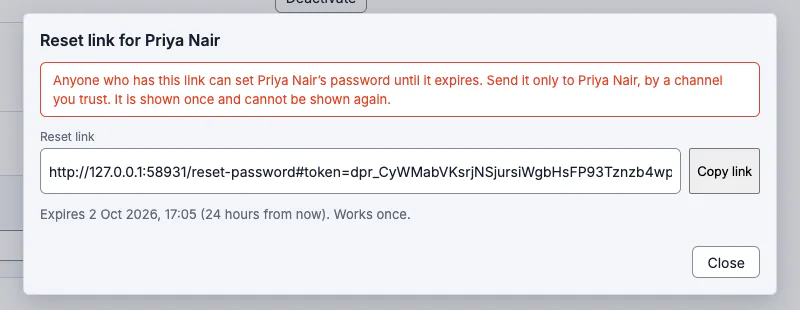
- An administrator link lasts 24 hours; an emailed one lasts 60 minutes. Both are settings (
auth.passwordReset.adminLinkHours,emailedLinkMinutes). - It works once. Using it signs the person out everywhere else and ends any other link they hold. Their API tokens keep working (as for a password change they make themselves).
- Only a signed-in administrator on a browser can create one. An API token cannot, whoever owns it.
What the person sees
The link opens Choose a new password. The 12-character rule and "Saving signs you out everywhere else" are shown before they type, and nothing signs them in afterwards: they go back to the sign-in page. A link that was used, has expired, was replaced by a newer one, was altered, or belongs to a deactivated account gets one identical answer, so the page cannot be used to learn which.

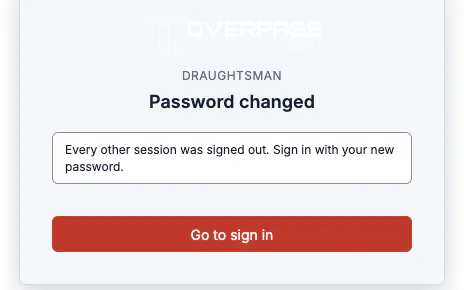
We ran this end to end in a real browser: an administrator created a link for an Editor, the Editor opened it in a fresh browser with no cookies, chose a new password, and was told it had changed. The address bar showed /reset-password with no token once the page had loaded.
Forgot password? (when email is set up)
The sign-in page offers Forgot password? only when outgoing email can send and a public address is set. Otherwise it says to ask an administrator for a reset link, and does not pretend.


- It cannot be used to find out who has an account, and it cannot lock anyone out: asking never ends a link someone already holds, never revokes a session and never locks an account. At most three emails go to one address in 15 minutes; asking is limited to ten per network address and three per address-and-email pair.
- Using a link is throttled by network address (failures only) and for dead links per account and address.
- An API token can neither ask for nor use a link.
With the development file provider (below) this is the whole message the server wrote for Priya, with the token replaced:
From: "Draughtsman" <diagrams@overpass.example>
To: priya@overpass.example
Subject: Reset your Draughtsman password
Date: Thu, 01 Oct 2026 16:06:40 GMT

Someone asked to reset the password for your Draughtsman account.

To choose a new password, open this link:

http://127.0.0.1:58931/reset-password#token=dpr_<32 random bytes>

The link works once and expires in 1 hour, at 17:06 UTC on 1 October 2026. Choosing a new password signs you out everywhere else.

If you did not ask for this, ignore this email: nothing changes unless the link is used. If you think someone else is trying to get into your account, tell your administrator.
How the link is protected
- The secret is 32 random bytes, stored only as a SHA-256 hash. It is single use through one atomic update, so two people using it at once have exactly one winner.
- It travels in the URL fragment, which browsers never send to a server: it is in no access log, proxy log or
Refererheader, and a mail scanner that fetches the link cannot spend it. The page reads it from the fragment and removes it from the address bar. - It is never in an application log, the security log, a backup (the backup leaves that table's rows out, so a restore cannot revive a link) or the instance export.
- A password change (by an administrator or by the person), a deactivation, a completed reset and the host-shell
reset-adminall end links that were outstanding. A mere request does not.
Each step is in the security log: Password reset requested, Reset link created by an administrator, Reset email sent (or could not be sent), Reset link used, Reset link refused (with the class of reason only) and Password changed with a reset link.

Admin, Email
Email is configured by an administrator in the browser, with no file to edit and no restart: fill in the form, Save, and it applies at once. You can instead put it in draughtsman.yaml (email:, plus server.publicUrl for the address used in links).
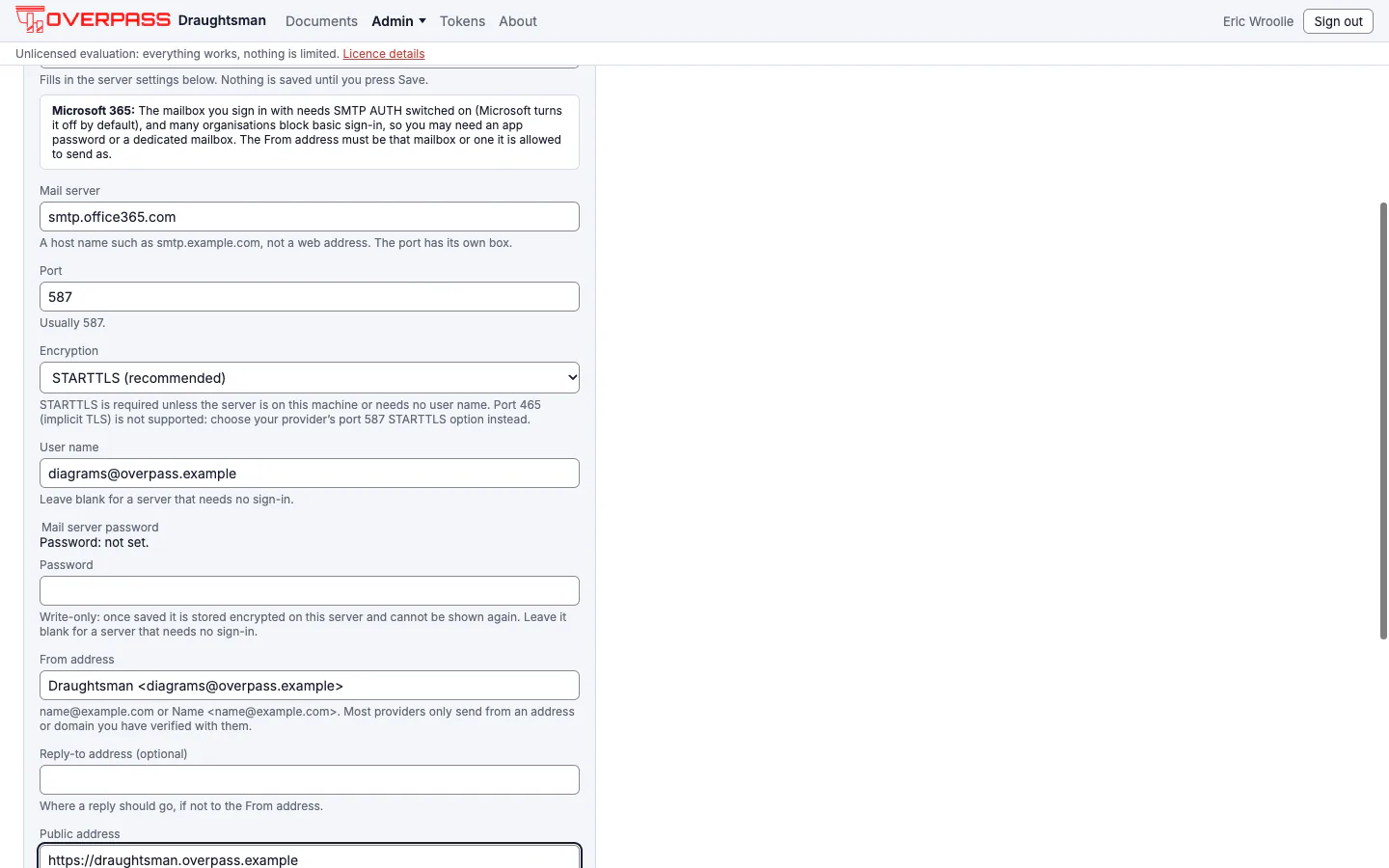
- Start from a provider: Microsoft 365 (
smtp.office365.com), Google Workspace (smtp.gmail.com), Amazon SES (email-smtp.us-east-1.amazonaws.com, change the region), SendGrid (smtp.sendgrid.net, user nameapikey), Postmark (smtp.postmarkapp.com), Mailgun (smtp.mailgun.org, orsmtp.eu.mailgun.orgfor an EU account) or My own mail server. Each fills only the server, port 587 and STARTTLS (and SendGrid's fixed user name) and shows the one thing that usually trips that provider up: an app password for Microsoft and Google, SMTP AUTH switched on for a Microsoft mailbox, SMTP credentials made in the SES console (not your AWS keys), a verified sender or domain for the others. - Fill in User name, Password, the From address, an optional Reply-to and the Public address people use to reach this instance (for example
https://draughtsman.example.com). The links in emails are built on that address and on nothing else. - Save. It is saved whole or not at all, with plain sentences naming any field that is wrong.
- Test saved settings sends one message to your own address. Test these values sends one through what is typed, without saving it, so you can check a password before committing to it. A failure tells you which kind of problem it was (could not connect, user name or password not accepted, the STARTTLS upgrade failed, recipient refused, no answer within 20 seconds) and never repeats the mail server's own reply. Tests always go to the signed-in administrator and are limited to five in 15 minutes.
- The password is write-only. The page says Password: set or not set and never shows it; you choose Keep (the default), Replace or Clear. It is stored encrypted under the key ring in the data folder, owner-only, and is never returned by any call, logged or put in a security event. A backup leaves it out unless you add
--include-secrets. - Port 465 (implicit TLS) is not supported. Use your provider's 587 STARTTLS option; the page says so. STARTTLS is required unless the server is on this machine or needs no user name, and the server refuses to send a password in the clear to another machine.
- Refused on entry: a host that is not a plain host name or address (no web address, user name, path, port or spaces), a From or Reply-to that is not exactly one address, any line break or control character (so no forged header or injected SMTP command), over-long fields, a bad port.
- The file wins. A value in
draughtsman.yaml(or, for the password, the environment variable or password file it names) wins and its field is read-only with the reason beside it. A key left at its default (empty, port 587,starttls) locks nothing, so copyingdraughtsman.example.yamlwhole is safe. Remove saved settings forgets everything saved on the page and returns to the file alone. - Only an administrator on a browser session can read or change it: an Editor gets 403, and so does an API token whatever its owner's role. This lets the server connect to any host and port you name, which is what a mail setting is; firewall outbound connections if that matters to you. Changes are logged as Email settings changed (naming what, never a value) and Email settings removed.

What was run, and what was not
- Run for real: creating a reset link, opening it in a clean browser and changing the password; Forgot password? with the
fileprovider (the message above is the file the server wrote); the Email page, its presets filled in the browser, the locked fields underemail.provider: file, Test saved settings (a test message was written to the outbox and the event logged); the security-log events;reset-adminand the other host commands. - Not run by us: sending through a real mail server or any of the named providers. The SMTP path is tested by Overpass's own suite against a test mail server (STARTTLS, refusal to send a password in the clear, address and header checks), but the presets' host names are starting values we did not connect to, and each provider's own rules (app passwords, verified senders, a sandbox) are theirs to apply. If a test says the user name or password was not accepted, check those first.