

Start here
Install
Draughtsman ships as a release archive for six platforms (macOS, Linux and Windows, Intel and Arm) and as a container image supplied with your licence, which you load from a file. No image is published. Downloads are provided to licensed customers (write to draughtsman@overpass.co.uk). This page says plainly what was run, on what, and what was not.
What has been checked
Everything in the table was checked by Overpass's build agents on 1 October 2026 or earlier, on the machines named. The Windows archive was run on a real Windows 11 Pro (Arm64) virtual machine with Windows Defender on, and the Docker image on Docker Desktop. No person has yet signed either off at the screen, the Linux service and the macOS LaunchDaemon have never been installed for real (their generated files were inspected, not run), and nothing was run on an Intel Windows PC. Nothing below promises more than that.
| Platform | Status | What was run |
|---|---|---|
macOS, Apple silicon (osx-arm64) | Run | Archive built, checksum checked, unpacked, started with an empty environment from another folder, used in a browser, backed up, restored, driven over MCP. This documentation was made on it. Not run: installing the LaunchDaemon (it needs sudo). |
macOS, Intel (osx-x64) | Built only | Built and its layout checked. Not started. |
Linux, arm64 (linux-arm64) | Run in a container | Unpacked and started in a bare ubuntu:22.04 arm64 container with nothing installed first; applied its migrations, printed the setup code, answered /api/health. A PDF was produced there too. Not run: systemd. |
Linux, x64 (linux-x64) | Built only | Built and its layout checked. Not started. Same code as arm64 with a different runtime pack. |
Windows, Arm64 (win-arm64) and x64 (win-x64) | Run on Windows 11 Arm64 | Both archives, on a Windows 11 Pro Arm64 virtual machine (build 26200, Defender on, no .NET or Node on the PATH): unpack, --version, a foreground start, first run, sign-in, the web app in Microsoft Edge, service install and uninstall, a service that starts at boot with nobody logged on and survived a reboot, the setup-code file, the data folder's access list, backup, restore and reset-admin, and PDF export from the service with Edge and with Playwright's Chromium. The win-x64 archive ran under Arm's x64 emulation. Not verified: an Intel or AMD PC, the SmartScreen and Smart App Control dialogs and the Firewall prompt (nobody was at the screen), IIS in front of the service, and any antivirus except Defender. |
| Docker image | Run on Docker Desktop | Built from the Dockerfile and run on Docker Desktop on an Apple-silicon Mac by the repository's smoke script: non-root (uid 10001), a fresh /data volume owner-only (700), no permissions warning, first run, an API token, a document and a layout, data kept across a container restart, backup, restore into a new volume and reset-admin inside the container. Not verified: a Linux server or Windows host, a bind mount on Linux, the Chromium build, and a published image (none exists). |
The evidence is in two reports kept by Overpass: the Windows install proof (windows-install-proof, 1 October 2026) and the Docker and Windows verification run (windows-and-docker-verification, the same day). The Windows proof found a first-run blocker and two security problems in the service install; all three were fixed and the fixes run again (see the Windows service notes below and the changelog).
Before you start
- You need nothing else installed. The archive carries the server, the web app, the layout engine and an official Node 22 beside it. No .NET, no Node, no database.
- Check the download. The archive comes with a
SHA256SUMSfile.shasum -a 256 -c SHA256SUMS --ignore-missing # macOS sha256sum -c SHA256SUMS --ignore-missing # Linux Get-FileHash draughtsman-0.1.0-win-x64.zip # Windows PowerShell: compare with the line in SHA256SUMS - The archives are not code-signed or notarised. Signing and notarisation are deferred, so macOS Gatekeeper and Windows SmartScreen stop the first run of a downloaded copy. Each section below says how to get past it, and the steps stay as written.
- Plain HTTP on loopback. By default the server listens on
127.0.0.1:5180and speaks HTTP only. To let other people reach it, put a TLS reverse proxy in front: see Deployment.
What is in the archive
draughtsman-0.1.0-<platform>/
  draughtsman[.exe]            the server (self-contained)
  wwwroot/                     the web app
  sidecar/                     layout engine and the Node 22 runtime it runs on
  .playwright/                 the PDF driver (used only if you turn PDF export on)
  draughtsman.example.yaml     every setting, annotated, at its default
  docs/                        the operator guides, also served inside the app at /docs/
  SECURITY.md, SKILL.md, CHANGELOG.md, INSTALL.md
  THIRD-PARTY-NOTICES.txt, DOTNET-THIRD-PARTY-NOTICES.txt, BUILDINFO.txt
Leave .playwright/ whole even if you never use PDF export. Its Node file and its package/ folder only work together.
macOS
Run (Apple silicon)tar -xzf draughtsman-0.1.0-osx-arm64.tar.gz
xattr -dr com.apple.quarantine draughtsman-0.1.0-osx-arm64
./draughtsman-0.1.0-osx-arm64/draughtsman --version
cd draughtsman-0.1.0-osx-arm64 && ./draughtsmanThe xattr command ran; the Gatekeeper prompt itself needs a copy downloaded through a browser, and we did not see it. Move the folder to where it will stay (for example /usr/local/draughtsman) before you install a service, because the service points at the executable's path.
On the first start the server keeps a key-encryption key in your login keychain, one item per data folder (named Draughtsman data key ring). It protects the stored AI key. Deleting the data folder leaves the keychain item behind; security delete-generic-password -s "Draughtsman data key ring" -a <account> removes it (the account id is in the start-up log line; we used this command to clean up after the test runs for this documentation).
As a service (launchd)
Plan inspected, not installedsudo ./draughtsman service install --dry-run # prints what it would do
sudo ./draughtsman service install
./draughtsman service statusThe dry run writes a plist for /Library/LaunchDaemons/uk.co.overpass.draughtsman.plist, uses /Library/Application Support/Draughtsman as the data folder, runs as root unless you pass --user, and sends output to <data>/logs/draughtsman.log. Run on a machine where it is not installed, service status printed Could not find service "uk.co.overpass.draughtsman" in domain for system and exited 1.
A LaunchDaemon cannot use the login keychain. With nothing else configured the server waits 20 seconds and then stops with a message naming the two safe choices: give it a key-encryption key (keyRing.protection: key and a keyRing.keyFile outside the data folder), or opt out deliberately with keyRing.protection: none. It never carries on with the key ring silently unprotected. Set one up before service install. The commands are in the macOS install guide, in the docs folder of the archive.
Linux
Run in a container (arm64)sha256sum -c SHA256SUMS --ignore-missing
sudo mkdir -p /opt/draughtsman
sudo tar -xzf draughtsman-0.1.0-linux-x64.tar.gz -C /opt/draughtsman --strip-components=1
/opt/draughtsman/draughtsman --version
/opt/draughtsman/draughtsmanUse a glibc distribution; Alpine (musl) was not tried. The Linux archive was run in a bare Ubuntu 22.04 container.
As a service (systemd)
Unit inspected, not installedsudo /opt/draughtsman/draughtsman service install --dry-run
sudo /opt/draughtsman/draughtsman service install
/opt/draughtsman/draughtsman service statusThe generated unit uses a systemd dynamic user, the data folder /var/lib/draughtsman, Restart=on-failure, NoNewPrivileges and ProtectSystem=strict. Logs go to journalctl -u draughtsman, and so does the first-run setup code. On Linux the key ring that protects the stored AI key stays as plain files unless you give it a key from outside the data folder; see Security.
Windows
Run on Windows 11 Arm64 (virtual machine)Every Windows run so far was on a virtual machine. The Windows install has not been verified on a physical Windows PC, nor on an Intel or AMD machine, and nobody has watched the SmartScreen or Smart App Control dialogs. Treat the steps below as run on a virtual machine, not as signed off.
Pick win-x64 for Intel and AMD, win-arm64 for Windows on Arm. An Arm machine can run the x64 archive under emulation, but it starts two to three times slower (about 6 to 10 seconds warm, against 4 native), so use the native one there. PowerShell:
Get-FileHash .\draughtsman-0.1.0-win-x64.zip -Algorithm SHA256       # compare with the line in SHA256SUMS
Expand-Archive .\draughtsman-0.1.0-win-x64.zip -DestinationPath 'C:\Program Files\Draughtsman'
& 'C:\Program Files\Draughtsman\draughtsman-0.1.0-win-x64\draughtsman.exe' --version- Where to unpack it. Somewhere the service account can read and that stays put:
C:\Program Files\Draughtsman. Not a folder underC:\Users: the service runs asLocalService, which cannot read a user profile, andservice installrefuses first, with the folder to use instead. Keep the destination short:Expand-Archiveinto a path of about 140 characters or more fails on Windows' 260-character limit, with a misleading message about a folder that "does not exist". - SmartScreen and Smart App Control. The archive is not code-signed yet. With SmartScreen in its usual mode a double-clicked first run may say "Windows protected your PC": choose More info, then Run anyway. On a Windows 11 machine with Smart App Control switched on, an unsigned program with no reputation is blocked with no "Run anyway" at all; you must turn the setting off (it cannot be turned back on without resetting Windows) or wait for a signed build. Nobody saw either dialog (the test ran with nobody at the screen), so this is what Microsoft documents, not what we observed.
Unblock-Filedoes nothing useful forExpand-Archive; it only matters if you extract with Explorer's Extract All. - Foreground. Set
$env:DRAUGHTSMAN_DATAto a folder, run the executable; it binds127.0.0.1:5180and the setup code is in that console window. If it stops at once with "Windows DPAPI cannot be used to protect the key ring", the logon you started it from has no DPAPI master key (an SSH session with a public key, a scheduled task with no stored password). The message names the two safe ways forward, a key-encryption key or a deliberatekeyRing.protection: none; the server does not start until you choose, the same rule as the macOS Keychain. - Firewall. A bind to
0.0.0.0was reachable from the same machine and not from another one on the Private profile, with no rule created. The prompt Windows may show the first time was not seen.
As a service
From an elevated PowerShell, with the archive under C:\Program Files. This is the plan, real output of service install --dry-run:
# create folder C:\ProgramData\Draughtsman
# run icacls C:\ProgramData\Draughtsman /inheritance:r /remove:g *S-1-5-32-545 *S-1-1-0 *S-1-5-11 /grant:r *S-1-5-18:(OI)(CI)F *S-1-5-32-544:(OI)(CI)F *S-1-5-19:(OI)(CI)F
# register the Windows event source draughtsman in the Application log
# run sc.exe create draughtsman binPath= "\"C:\Program Files\Draughtsman\draughtsman.exe\" serve --DRAUGHTSMAN_DATA \"C:\ProgramData\Draughtsman\"" start= auto obj= "NT AUTHORITY\LocalService" DisplayName= "Draughtsman diagram server"
# run sc.exe failure draughtsman reset= 86400 actions= restart/5000/restart/5000/restart/30000
# run sc.exe start draughtsman
Run it without --dry-run, then draughtsman.exe service status or Get-Service draughtsman. It installs in about two seconds and the server answers a few seconds later (about ten on the very first start, while Defender scans the 125 MB executable). Verified: it starts at boot with nobody logged on and came back after a reboot with the sign-in and documents intact; the failure actions were configured but the service was not killed to watch it restart.
- The setup code is in a protected file, not in a log. The Application log can be read by every local user, and anyone who saw the code first could create the administrator. A service writes the code to
C:\ProgramData\Draughtsman\setup-code.txt, which only Administrators and SYSTEM can read, and logs where it is. From an elevated prompt run:
It prints the code, and refuses with a message once an administrator exists or if it cannot read the file. The file is deleted the moment the first administrator exists; a restart before then writes a new code and ends the old one. The first-run page says this when it sees it is running as a service. (On a Mac, where there is no such file, the same command printed& 'C:\Program Files\Draughtsman\draughtsman-0.1.0-win-x64\draughtsman.exe' first-run-code --DRAUGHTSMAN_DATA 'C:\ProgramData\Draughtsman'There is no setup code at …/setup-code.txt. The server writes it when it starts with no administrator, and only when it runs as a Windows serviceand exited 1.) - The data folder is private. An earlier build left
C:\ProgramData\Draughtsmanreadable by every local user (it inheritedUsersread and create fromProgramData), which would have exposed the database and its password hashes. The install now cuts inheritance and leaves full control to SYSTEM, the Administrators and the service account, by security identifier so a localised Windows works. At every start the server warns, with theicaclsfix, ifUsers,EveryoneorAuthenticated Userscan read or change the folder. Do not add them back. - Logs. The service writes to the Application event log under the source
draughtsman(service installregisters it). A server that stops while starting, for example on the DPAPI check, writes its reason there. For ordinary files setlogging.file.enabled: trueindraughtsman.yaml: daily files appear inC:\ProgramData\Draughtsman\logs\. - Settings and admin commands. Settings go in
C:\ProgramData\Draughtsman\draughtsman.yaml;Restart-Service draughtsmanapplies them.backup,restore,reset-adminandfirst-run-codetake the data folder fromDRAUGHTSMAN_DATAor--DRAUGHTSMAN_DATA; run them in an elevated prompt. - Stored keys. The AI key's protection defaults to Windows DPAPI scoped to the service account (verified working under
LocalService). A backup made with--include-secretstherefore cannot be opened on another machine or by another account. - The service is named Draughtsman diagram server in the Services list. IIS is never the host: the archive carries no
web.config, and an IIS site proxies to the service. IIS with Application Request Routing was not tried.
PDF export on Windows
Two ways were run from the service, each producing a one-page PDF in 2 to 9 seconds. Every render, and the check behind /api/health, has a time limit (export.chromium.timeoutSeconds, 60): a browser that stops answering is stopped by process id (never by name) and the request fails with 504 and what to do, instead of hanging. The browser runs on a throw-away profile folder under C:\ProgramData\Draughtsman\chromium. Health says PDF works only after a page was actually printed.
- Microsoft Edge, already installed:
export.chromium.enabled: trueandexport.chromium.path: "C:\\Program Files (x86)\\Microsoft\\Edge\\Application\\msedge.exe". It worked from the service (five renders in a row, 2.5 to 5 seconds each). An earlier run on the same machine saw Edge accept the request and never answer under the service account; it could not be reproduced and the cause is not known, which is why the time limit exists. If you see504, use Playwright's Chromium. - Playwright's Chromium, independent of the machine's Edge: from the archive folder run
.\.playwright\node\win32_x64\node.exe .\.playwright\package\cli.js install chromium(about 700 MB, 40 seconds) withPLAYWRIGHT_BROWSERS_PATHset to a folder the service can read, give the service the same variable, setexport.chromium.enabled: truewith nopath, and restart. The exact commands are in the Windows install guide, in thedocsfolder of the archive. - On Windows on Arm the PDF driver is the x64 one running under emulation (Playwright ships no Arm64 Windows build, so both archives carry it); both browsers printed through it.
Docker
Run on Docker Desktop (Apple silicon) No published imageNo image is published, and the checks above were run on one built from the repository's Dockerfile (a warm build took 43 seconds; a first build with nothing cached is dominated by downloads). Your copy is the container image supplied with your licence, loaded with docker load; the docker build line below is how Overpass made the one it tested. The image runs as a non-root user (uid 10001) on a small ASP.NET Core runtime image with Node 22 added for the layout engine. The data folder is a volume at /data.
docker build -t draughtsman:0.1.0 .
docker run -d --name draughtsman --restart unless-stopped \
  -p 127.0.0.1:5180:5180 \
  -v draughtsman-data:/data \
  draughtsman:0.1.0
curl -s http://127.0.0.1:5180/api/health          # {"status":"ok"}
docker logs draughtsman 2>&1 | grep "setup code"
Inside the container draughtsman is on the path, so the admin commands read docker exec draughtsman draughtsman backup --out /data/backups/ (run: exit 0, bundle and checksum written owner-only) and docker exec draughtsman draughtsman reset-admin <email> --generate. A backup written to /data/backups/ is on the same volume as the data: it guards against a mistake, not against losing the volume, so mount a second folder or docker cp it out. Restore into a new volume with a one-off container (docker run --rm -v NEW:/data -v backups:/backups:ro draughtsman:0.1.0 restore /backups/<bundle>; run, and the original administrator signed in on it).
- Publish to loopback. The container binds every interface inside; what limits who can reach it is your
-p.-p 5180:5180opens it to the network, and on Linux Docker bypassesufw. - A bind mount on Linux must belong to uid 10001 (
chown -R 10001:10001, thenchmod 700). A named volume needs nothing. Neverchmod 777. - Server-side PDF needs a browser in the image (the editor's File, Export PDF… needs nothing: it prints from the person's own browser). Build with
--build-arg INSTALL_CHROMIUM=truefor it; it adds several hundred megabytes. - A local AI model on the host. Inside a container
localhostis the container. Usehttp://host.docker.internal:11434as the Ollama endpoint on Docker Desktop. On Linux add--add-host=host.docker.internal:host-gateway(not tried). - For an offline host, the container image supplied with your licence is already a file: check its checksum and
docker loadit there. (Overpass makes that file withdocker saveand supplies a checksum with it.)
Optional: server-side PDF export
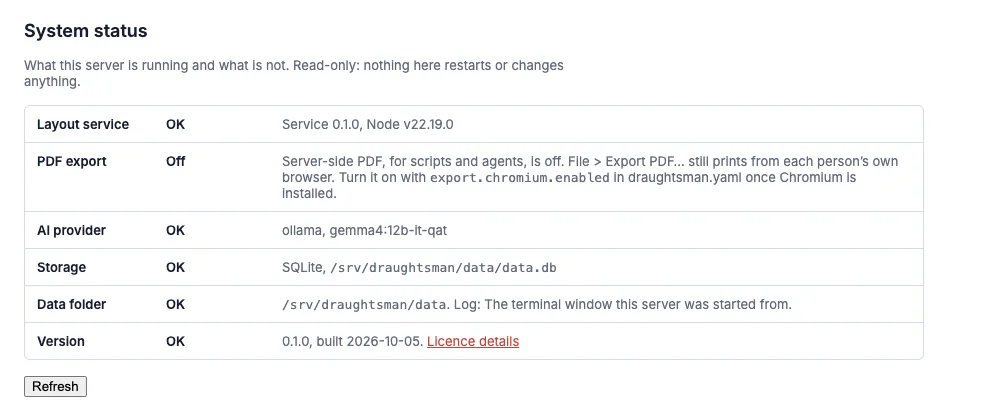
PDF needs nothing installed. File, Export PDF… draws the diagram in the person's browser and opens the browser's own print dialog, where they choose Save as PDF; PNG and SVG export also run in the browser. Nothing is sent to the server and nothing is needed on it (how that works). What is optional is server-side PDF, for scripts, agents and scheduled exports (the /api/documents/{id}/pdf route and the render_document tool's pdf format). It is rendered by a headless Chromium on the server, which is not bundled, and it is off until you give the server a browser. The admin Status page says so, in words:
With a Chrome you already have, add this to draughtsman.yaml in the data folder and restart:
export:
  chromium:
    enabled: true
    path: "/Applications/Google Chrome.app/Contents/MacOS/Google Chrome"
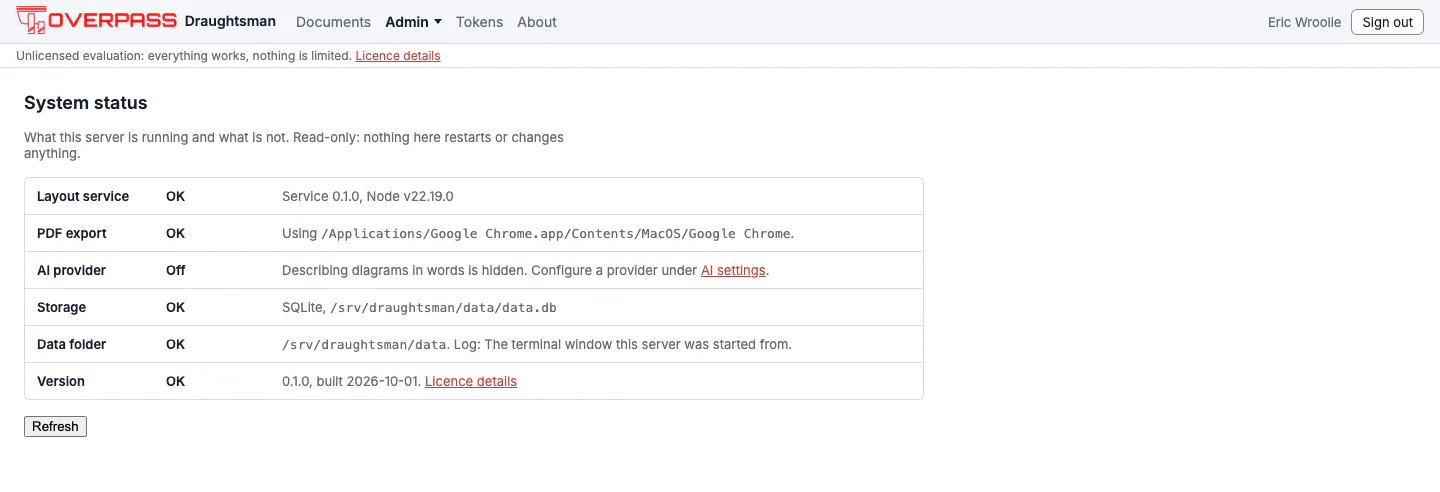
We ran exactly this on the macOS build (on 1 October, and again on 5 October on the current build, where the server route returned a 27,513-byte PDF): GET /api/health then reported export.pdf: true, the admin Status page said "Using /Applications/Google Chrome.app/Contents/MacOS/Google Chrome", and GET /api/documents/<id>/pdf answered 200 with application/pdf (15,678 bytes in 1.4 seconds for the sample flowchart) and a body starting %PDF-1.4. The other route, downloading Playwright's Chromium with the driver that ships in .playwright/, is described in the PDF export guide, in the docs folder of the archive, and was proved by Overpass on the macOS and Linux archives; we did not repeat it.
The PDF driver, and what Status says when it is not working
PDF printing goes through Playwright's driver, which must sit as real files beside the executable, in .playwright/ (a Node file and a package/ folder that only work together). An earlier build folded that Node file into the single-file bundle without its permissions, so PDF could not be switched on from an archive; the archive now keeps the driver as ordinary files and the release script refuses to publish an archive whose driver is missing, partial, not executable or the wrong version. Do not delete or move part of .playwright/.
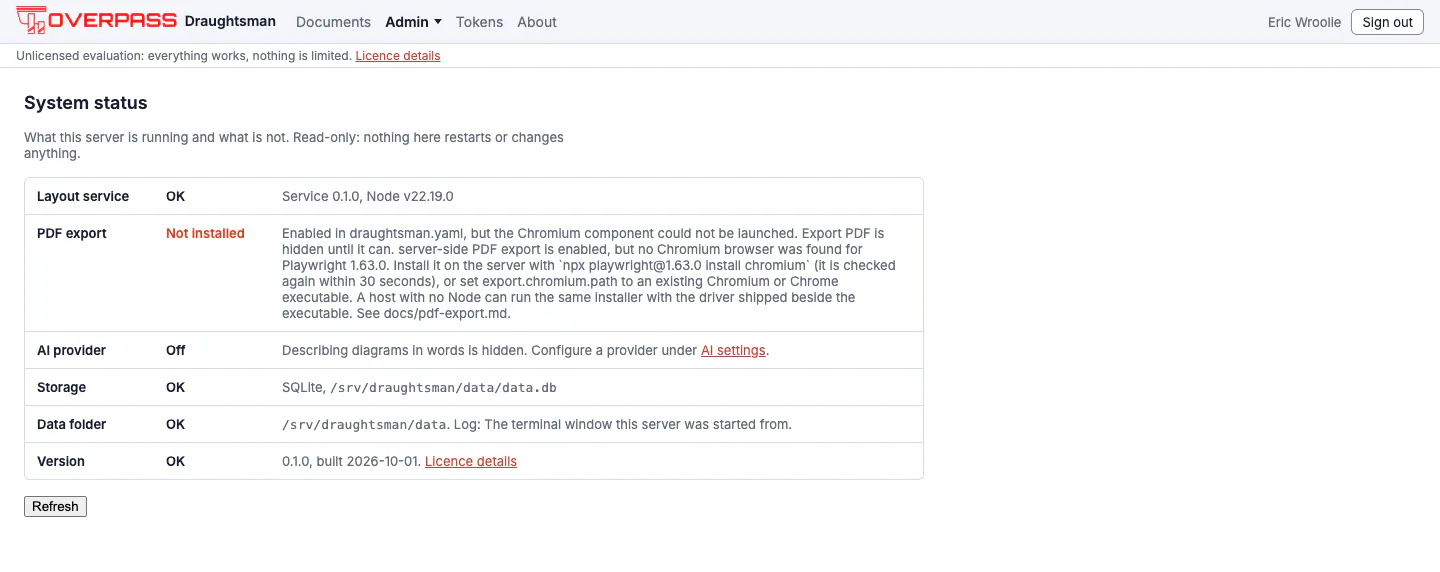
The admin Status page and /api/health now say which part is missing, so a missing driver does not read as a missing browser. Run for real on this build, with export.chromium.enabled: true and no browser installed, Status said Not installed and the health detail was: server-side PDF export is enabled, but no Chromium browser was found for Playwright 1.63.0. Install it on the server with npx playwright@1.63.0 install chromium (it is checked again within 30 seconds), or set export.chromium.path to an existing Chromium or Chrome executable. A host with no Node can run the same installer with the driver shipped beside the executable. (pdfProblem is browser; the other values are disabled and driver. A launch that merely ran out of time is remembered for ten seconds, not thirty, and is reported as a timeout with its own advice.) A driver problem was not reproduced here; it is quoted from the repository's guide.
Installing without internet access
The archive is already offline: copy the file and its checksum across. Nothing is downloaded at run time. The one exception is the browser for server-side PDF, which is not in the archive (PDF from the editor prints from the person's own browser and needs none); on an offline host point export.chromium.path at a Chrome, Chromium or Edge that is already installed.
One thing about the unpacked executable
The server is a single file that unpacks one native library (SQLite, about 2 MB) on first start into ~/.net/draughtsman/<hash>/. A new build makes a new folder and the old one is never removed. They are only a cache: stop the server and delete ~/.net's draughtsman folder to clear it. Services set DOTNET_BUNDLE_EXTRACT_BASE_DIR so an account with no home folder still works.