

Draughtsman documentation
Diagrams your AI can edit, on your own server.
Self-hosted. Bring your own AI, even a fully local one. Nothing leaves your network.
Draughtsman is self-hosted diagramming for teams that work with AI agents. A diagram is a typed graph with a lossless text form. People draw it in a browser, agents read and write the same graph, and nothing leaves your network unless you tell it to: if you choose a hosted AI model, what you send to it goes there, and Security and your data lists every such connection and how to check it.
What it is
Draughtsman is a web application you run yourself. You unpack one folder (or run one container), open a browser, and draw. It is built around three ideas.
- The model is the truth, the picture is a render. A diagram is a graph of typed nodes and edges: a
service, adatabase, adecision, asequencemessage. The canvas, the SVG export and the server-side render are all drawn from that graph. - The graph has a text form. The Draughtsman DSL is a short, readable, lossless description of a diagram. Anything the editor can draw can be printed as DSL and read back byte for byte, which is what makes it safe for an agent to edit.
- Agents are first-class users. Eight MCP tools (
list_documents,read_document,create_document,patch_document,render_document,diff_documents,critique_document,get_schema) work over HTTP and stdio. An agent's edit appears live in the editor you have open, behind an automatic checkpoint you can restore.
What you get
- A fast editorSnapping, smart guides, orthogonal connectors that route around shapes, exact undo, keyboard everything. A 2,000-node diagram starts drawing in about a quarter of a second on a recent Mac.
- Ten kinds of diagramFlowchart, architecture, freeform, sequence, ER, UML class, BPMN, swimlane, org chart and state machine, with unbranded technology icons.
- Open formats in and outImport Mermaid, SQL, DSL, draw.io and Visio (and Lucidchart, through Visio). Export SVG, PNG, PDF from your browser, Mermaid, DSL and a self-contained fly-through HTML file.
- Diagrams in gitKeep diagrams as text files in your repository and review a diagram change in a pull request in plain sentences, with
draughtsman diffandcheck. - Bring your own AIOllama on your own machine, or an OpenAI-compatible endpoint, Anthropic or Azure OpenAI. Off until you turn it on.
- A safety netAutosave, version history with compare and restore, and a bin that keeps deleted diagrams for 30 days.
- Nothing phones homeNo telemetry, no update check, no licence server. The licence is a signed file checked offline.
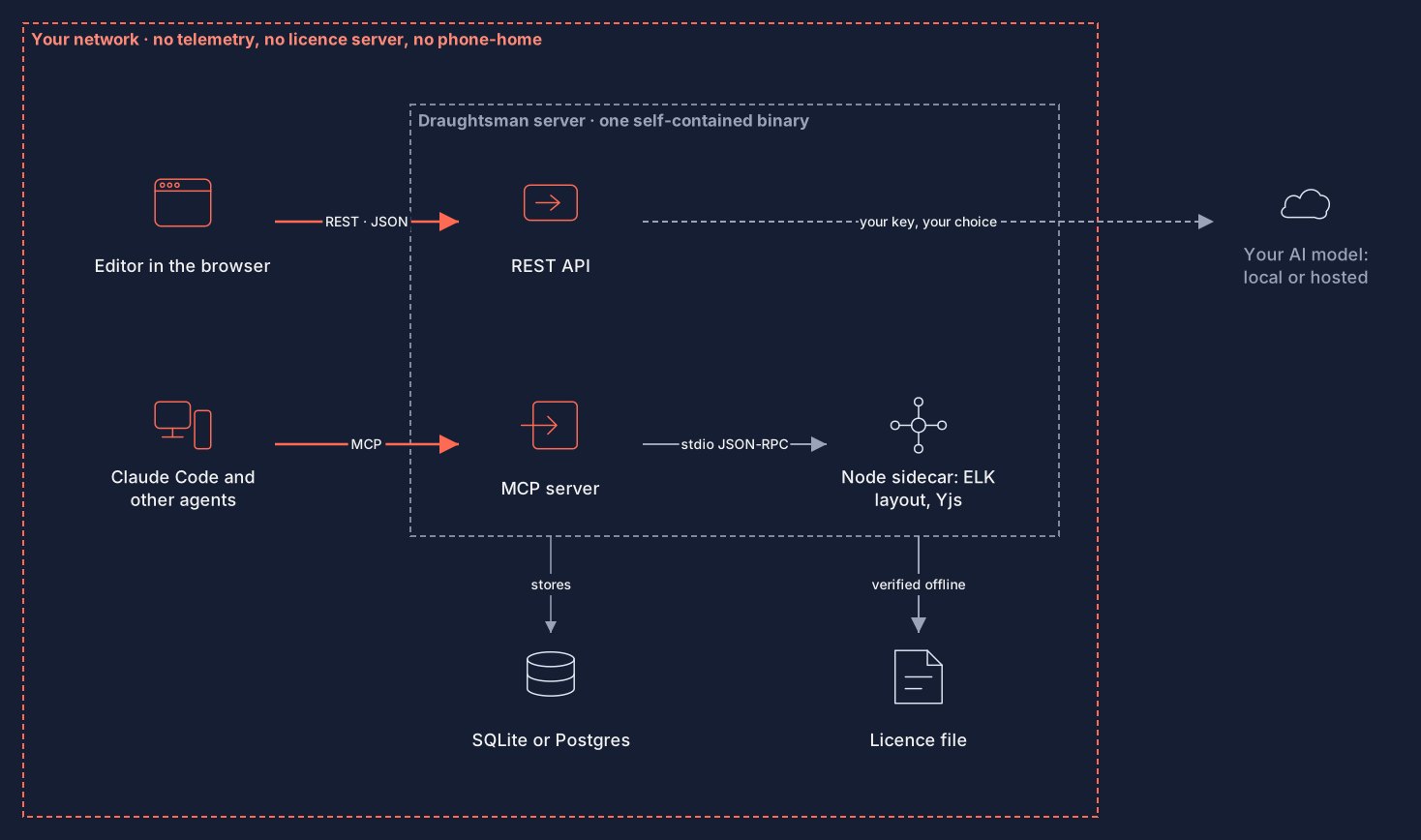
The architecture in one picture
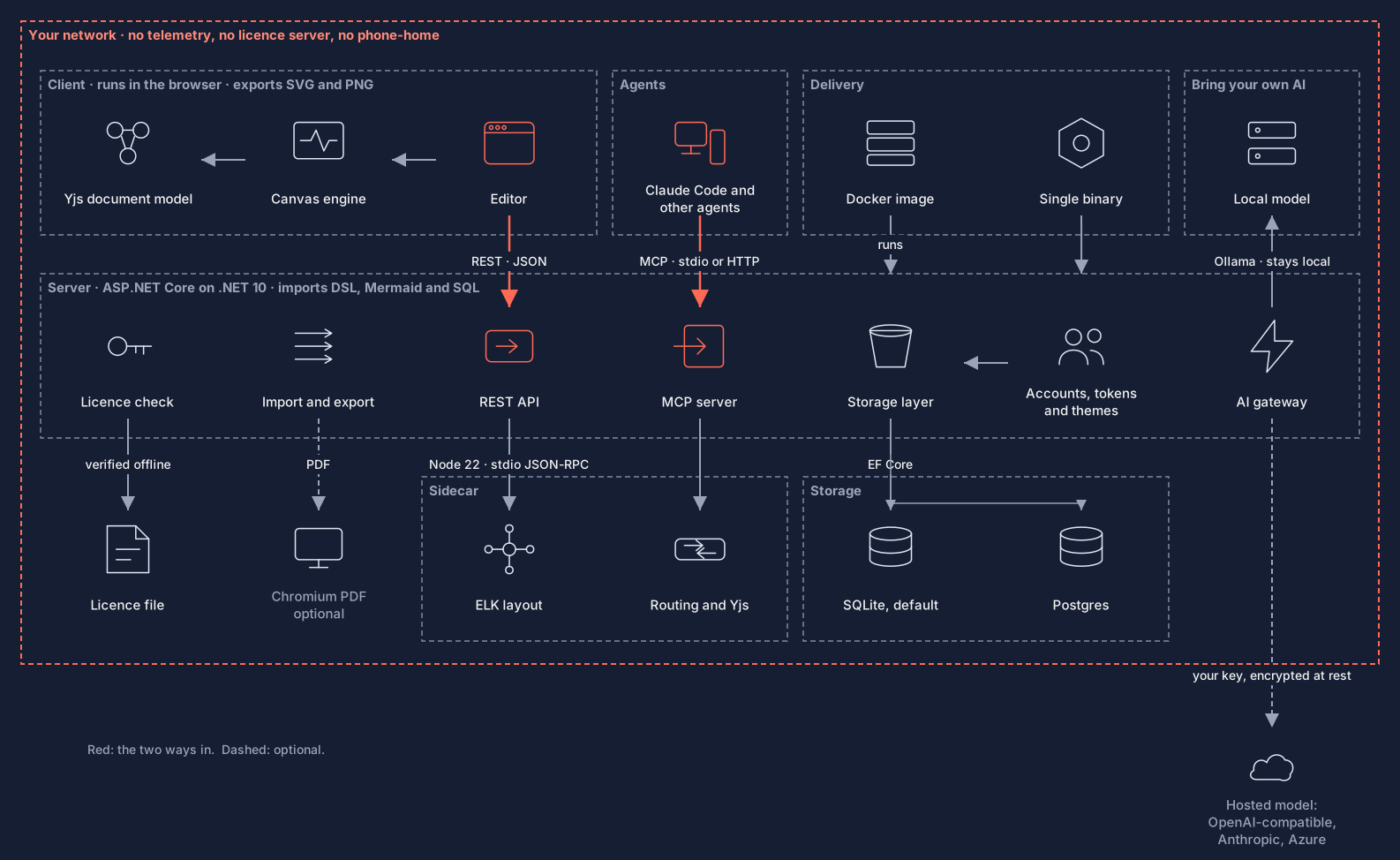
The server is an ASP.NET Core application that serves the web app, the REST API and the MCP endpoint. A Node sidecar, started and supervised by the server, does automatic layout, connector routing and the shared document format. Storage is SQLite by default, or Postgres. The browser editor, an agent and the AI model are the only things that talk to it. The full version, with every component, is below.
Who it is for
It suits a team or organisation that wants diagrams on its own server, with its own sign-in, and that either uses AI agents already or expects to. It is aimed at technical diagrams: architecture, flows, sequences, schemas, processes. It is one organisation's tool, not a public collaboration service. If you need real-time co-editing, share links or per-document permissions, read the list of what is not there yet before you decide.
The state of the product today
This documentation describes the 0.1.0 codebase as of 5 October 2026 (repository commit 0b50023), and every command in it was run against it unless the page says otherwise. 0.1.0 itself has not been cut as a numbered release. What is finished, and what is not, if you are evaluating:
- Checked on real systems: macOS on Apple silicon; Linux arm64 in a container; Windows 11 Arm64 on a virtual machine, with both Windows archives, including as a service that survives a reboot; and the Docker image on Docker Desktop. See Install.
- Not verified on real hardware: the Windows install has not been run on a physical PC, nor on an Intel or AMD machine, and nobody has watched the SmartScreen and Smart App Control dialogs. Also not checked: IIS, a Linux server under
systemd, and the Intel Mac and x64 Linux archives (built only). - The release archives are not code-signed or notarised (signing is deferred), so macOS and Windows warn on first run, and Windows Smart App Control blocks an unsigned program outright. Downloads are provided to licensed customers. No container image is published: you build one from the Dockerfile or load one exported for you.
- Licensing is half built. A genuine licence cannot verify until the production verification key is built into a release, and the service that would sell and issue licences is not live. An unlicensed copy is a fully working evaluation on the honour system, with a small notice on exported pictures. See Licensing.
- Upgrades are tested, with limits. SQLite upgrades are copied first and undone automatically on failure; Postgres has no automatic rollback. See Upgrading safely.
- Sign-in is local accounts: first customers use local accounts, with no single sign-on and no multi-factor authentication. People can recover their own passwords by an administrator's reset link, or by email if you set it up. There is no per-document permission model. See the FAQ.
Where to start
- Quick start: a first diagram in about five minutes.
- Install and First run: the platform you will actually use.
- Agents and MCP, if the point is to let an agent draw.
- Security and your data, if you are the person who has to approve it.
- Upgrading safely and Password recovery and email, if you are the person who will run it.
- Air-gapped installs, if the server has no route to the internet.