
Self-hosted diagramming for organisations that work with AI agents
Diagrams your agents can edit, on servers you control.
Draughtsman runs on your own hardware. A diagram is a typed graph with a lossless text form, so people draw it in a browser and AI agents read and change the same diagram. In its default configuration it makes no outbound connection: no telemetry, no licence server, no phone-home.
- No telemetry
- No licence server
- Licence checked offline
- Runs with no internet
- Bring your own AI, or none
01 The problem
Your diagrams sit outside your control, and your agents cannot touch them.
-
They live in someone else's cloud.
A hosted diagramming tool holds your architecture, your data flows and your network layout on its servers, and needs a connection to work. For a regulated or privacy-conscious organisation, that is one more supplier to approve.
-
Agents cannot edit a picture.
Your engineers already use AI agents on code, tickets and documents. A diagram stored as shapes on a canvas gives an agent nothing reliable to read or change, so diagrams stay a manual job.
-
So they drift.
A diagram that only a person can update is updated when someone has time. Reviewers cannot see what changed, and the picture slowly stops describing the system.
02 The answer
A diagram is data. The picture is a render of it.
A typed graph
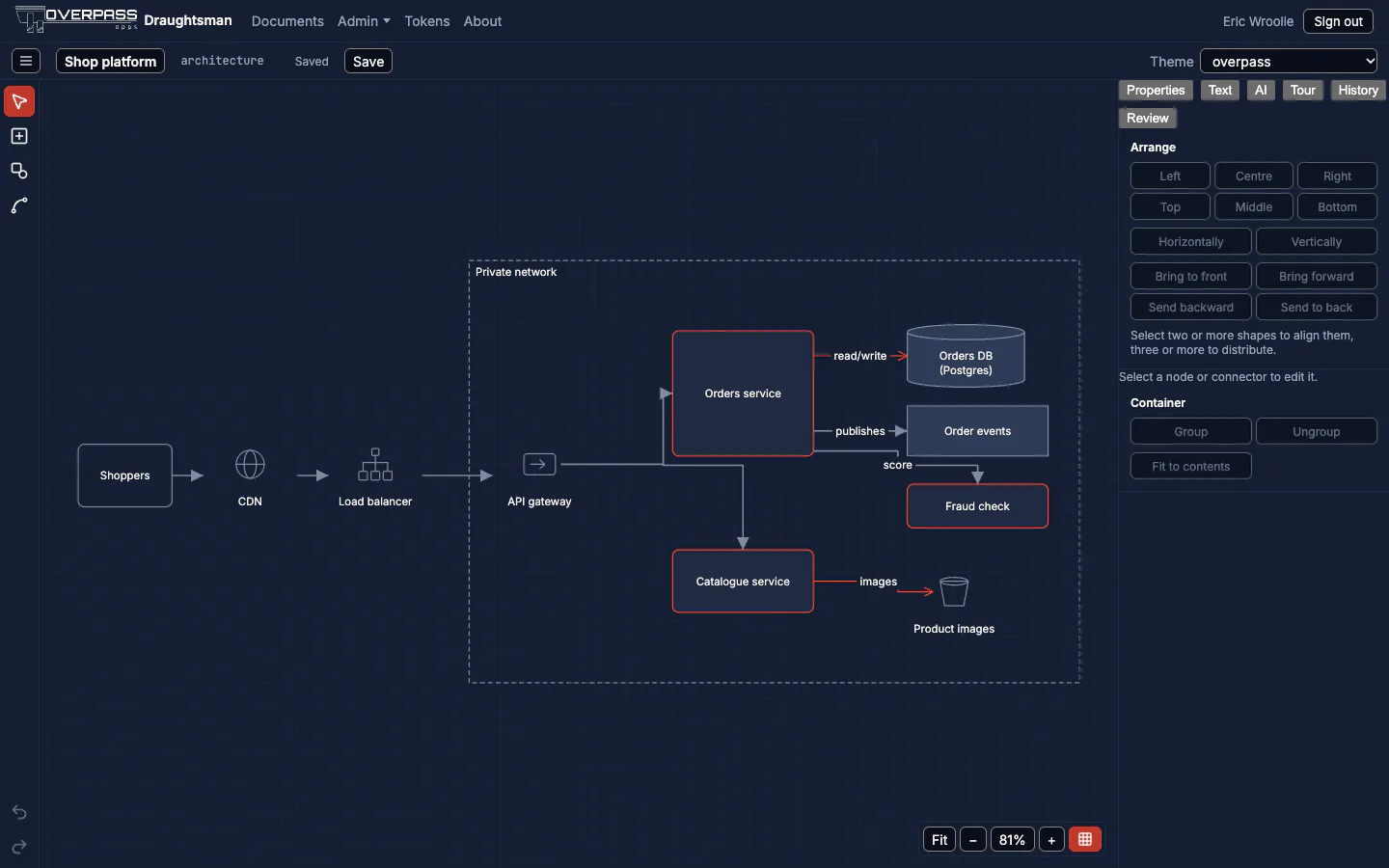
Every diagram is a graph of typed nodes and edges: a service, a database, a decision, a sequence message. The canvas, the SVG export and the server-side render are all drawn from it.
A lossless text form
Anything the editor can draw can be printed as Draughtsman DSL and read back byte for byte. That is what makes it safe for an agent to edit, and easy to keep in git.
Changes you can review
Commit diagrams as text beside the code they describe. draughtsman diff says what changed in plain sentences, ready for a pull request.

$ draughtsman diff base.dsl after.dsl --ignore-layout
### Diagram changes: `Order service`

- Added node `Order events` (`queue`)
- Added `flow` edge `Orders API` to `Order events` labelled `publishes`
- Edge `Orders API` to `Postgres` relabelled from `read/write` to `reads`
- 1 layout-only change03 Agents
Your agent is just another author.
Draughtsman serves eight tools over the Model Context Protocol, on your own instance. An agent lists, reads, creates, patches, renders, compares and critiques diagrams, and the diagram a colleague has open updates when it writes.
[
  { "op": "updateNode", "id": "n_api",
    "set": { "label": "Orders API v2" } },
  { "op": "addNode", "node": { "id": "n_cache",
    "kind": "cache", "label": "Redis" } },
  { "op": "addEdge", "edge": { "id": "e_3",
    "kind": "data", "from": { "node": "n_api" },
    "to": { "node": "n_cache" } } }
]- Live in the editor. We had an agent add a node over MCP; it appeared in an already open editor 0.3 seconds after the patch returned.
- A checkpoint before every agent write. History can restore the diagram as it was, and your undo never reverses an agent.
- No lost work. The server checks nobody else wrote in between, so a concurrent edit is never overwritten.
- On the record. The audit trail names the person who owns the token, and the agent and model that made the change.
- Scoped access. HTTP with an expiring token, read-only if you choose, or stdio on the same machine with no port open. Tested with Claude Code.
04 Your AI, your choice
Bring your own model. Or a fully local one. Or none.
Draughtsman ships no model and calls none until an administrator configures one. With nothing configured, the AI panel is hidden and nothing is sent anywhere.
- Local Ollama on your own hardware
- Hosted An OpenAI-compatible endpoint, such as your own gateway
- Hosted Anthropic
- Hosted Azure OpenAI
Describe a diagram in words and it is drawn and laid out for you, or turn a diagram into a design document, a runbook or a plain-English explanation.
Run a model with Ollama on your own machine and nothing leaves your network. Choose a hosted model and what you send goes to that provider: your decision, not ours. Pick a plain local model name; Ollama forwards names ending in :cloud to its own cloud.

05 Security and data control
Written for the person who has to approve it.
Everything is stored in one data folder, or in a Postgres you run. The server makes no outbound connection of its own unless an administrator configures one. We do not ask you to trust that: each claim below says how to check it.
-
Outbound
No telemetry, update check, crash reporter or licence server. Overpass runs a test on every build that listens inside the server process to every name lookup and connection while it is driven through a day's work.
-
Browser
The page talks only to your server. In our check, loading the editor and admin pages in Chrome made 98 requests, all to the server's own address. Fonts are bundled, nothing comes from a CDN, and the server's Content-Security-Policy blocks any other origin.
-
Sockets
One listening socket. A snapshot of the running server showed one listener and nothing else; the layout process opens none.
-
Accounts
Hardened by default. Sign-in on every route, Argon2id passwords, sessions and API tokens stored only as hashes, tokens that expire and can be read-only, throttled sign-in and per-user rate limits.
-
Audit
An append-only security log. Sign-ins and failures, role changes, tokens, password resets and whole-instance exports, each with who, when and from where. Never a password or token.
-
Files
Owner-only data. On Unix every file the server creates is owner-only, and it warns at start-up if the folder is open to other users.

What can leave, and only when you switch it on
| Feature | Goes to | Default |
|---|---|---|
| AI | The model endpoint you name | Off |
| The mail server you name, for password resets | Off | |
| Postgres | The database server you run | Off (SQLite) |
| Theme from a website | The one address an administrator types | Off |
We hold no security certification and do not claim one. We publish what we tested and how to repeat it instead.
06 For IT
One folder or one container. Nothing else to install.
Small footprint
A release archive is one self-contained folder: the server, the web app and the layout engine with its own Node. SQLite is built in, or point it at Postgres. No .NET runtime, package manager or container registry is needed on the server.
Air-gapped
Carry across the archive, its checksums and the software bill of materials (CycloneDX 1.5). Nothing is downloaded at first run or later. Overpass runs the Docker image with no network at all.
Licensed offline
A licence is a signed file checked against a key in the program. Coverage depends on the date the build was made, never the server's clock, so a drifting clock cannot expire anything.
Upgrades you can undo
On SQLite an upgrade copies the data first and is undone automatically if it fails. draughtsman config check tests the new version against your settings before you swap.
Backups are files
draughtsman backup writes one zip wherever you point it. Secrets stay out of a default backup unless you ask for them.
Behind your proxy
The server listens on loopback; your reverse proxy terminates TLS. Caddy and nginx recipes were run against real servers in containers.
Platforms macOS, Linux and Windows (Intel and Arm) and Docker. Run so far: macOS on Apple silicon, Linux arm64 in a container, Windows 11 Arm64 as a service, and the Docker image. What was and was not run
07 How it fits
Everything inside the box runs on your hardware.
The browser editor and your agents reach one Draughtsman server through a REST API and an MCP server. The AI model is the only optional outward connection, and you choose it.

08 Pricing
Per organisation. Perpetual. Not per seat.
These are the intended list prices at the time of writing. They are indicative, not an offer: the final wording and price are confirmed at purchase.
Team
£1,500
Up to 50 people
Per organisation, one instance
Unlimited
£3,000
No stated limit on people
Per organisation, one instance
- A perpetual licence for one instance, with 12 months of updates included. Renewal for later updates is optional.
- You keep running the version you have for as long as you like.
- The people limit is a statement on the licence, not something the product counts.
- Reading, saving and exporting your own diagrams never depend on the licence, in any state.
09 Where it stands
What is ready today, said plainly.
Ready to evaluate
- Version 0.1.0, the first release, is documented page by page against the codebase, saying what was and was not run.
- An unlicensed copy is a fully working evaluation: nothing is limited and there is no countdown. Exported pictures carry a small evaluation notice.
- Ten diagram types, imports from Mermaid, SQL, draw.io and Visio, and exports to SVG, PNG, PDF, Mermaid, DSL and a self-contained fly-through.
Not there yet
- 0.1.0 has not been cut as a numbered release, and licence sales are not live. Downloads go to licensed customers.
- The release archives are not yet code-signed, so macOS and Windows warn on first run.
- Local accounts only: no single sign-on or multi-factor authentication yet, and no per-document permissions.
- No real-time co-editing. Two open editors merge each other's changes, but that is not live collaboration.
10 Questions
The questions your security and procurement teams will ask.
Where does our data go?
Nowhere, in the default configuration. Diagrams, users and settings live in one data folder on your server, or in a Postgres you run. The only things that can reach another machine are an AI endpoint, a mail server, a database server and a theme fetch, and each is off until an administrator turns it on and goes only where they point it. The full list.
Do we have to give AI our diagrams?
No. AI is off until an administrator configures a provider. Point it at a model on your own network and it stays there. If you choose a hosted model, the AI page says exactly what each feature sends: generating sends your description and, when updating, the open diagram; turning a diagram into a document sends only its outline, never geometry, style or images.
Can our agents edit diagrams?
Yes. Eight MCP tools work over HTTP with a token, or over stdio on the same machine. Edits are addressable operations, a checkpoint is stored before each one, and the audit trail records the agent and model. Read-only tokens can look but not change. Agents and MCP.
Can we run it air-gapped?
Yes. The archive carries everything and nothing is downloaded at run time. The licence is a file you carry across, checked offline. PDF from the editor prints from the person's own browser. A local model through Ollama gives you AI with no outbound traffic. Air-gapped installs.
What does it cost?
Indicatively £1,500 for up to 50 people, or £3,000 unlimited: a perpetual licence for one instance per organisation, with 12 months of updates. Not per seat. Prices are confirmed at purchase.
What happens if our licence or update entitlement lapses?
Nothing stops working. The licence is perpetual, so the version you have keeps running. A build newer than your update entitlement runs exactly as before and shows an administrator a banner. A missing or broken licence file never blocks reading, saving or exporting your diagrams; it runs as the evaluation.
Does it phone home to check the licence?
No. A licence is a JSON file with an Ed25519 signature, checked against a public key built into the server. There is no licence server, no activation and no seat counting.
Does it support single sign-on?
Not yet. Version 0.1.0 uses local accounts with no single sign-on and no multi-factor authentication. Administrators can issue password reset links, and people can reset by email if you configure outgoing mail.
Is it certified?
No, and we do not claim any certification or audit. Instead the documentation lists every outbound connection, the checks we ran with their real output, and the checks you can run yourself, including putting the server behind a default-deny egress firewall.
Can we move existing diagrams in, and get them out again?
draw.io and Visio files import directly, and Lucidchart through a Visio export; the importer lists what it could not bring across. Mermaid, SQL and DSL import too. Leaving is easy: an administrator can export every diagram as JSON and DSL with images in one zip. Moving from draw.io, Visio and Lucidchart.
See it on your own network.
Tell us where it would run and how you would use AI, and we will arrange an evaluation. One email to Overpass, no forms and no sales sequence.
Or write to draughtsman@overpass.co.uk